Traffic light with an Arduino Nano
An Arduino Nano runs a small traffic light: green, then yellow, then red, then green again. On the road below, toy cars drive through on green, brake on yellow and queue at the stop line on red. When the light turns green they pull away one after another.
From the Short Working Traffic Light with Arduino Nano: Green, Yellow, Red (200K views, posted 14 October 2026). Opens on YouTube.
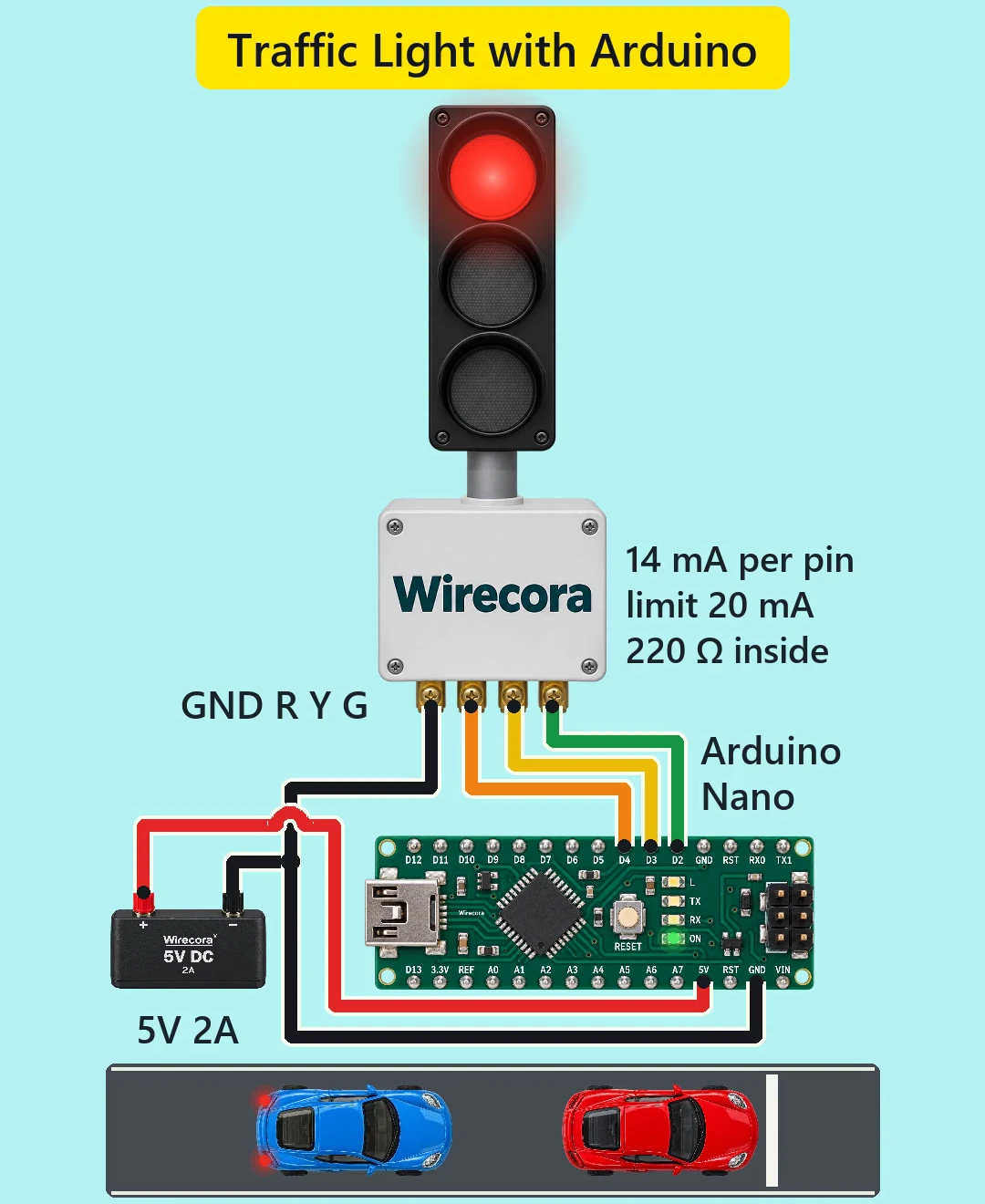
Parts
- Arduino Nano (an Uno works the same: same pins, same sketch)
- Traffic light LED module with four pins GND, R, Y, G (red, yellow and green LEDs with their cathodes joined on GND). The pin order differs between makers, so read the labels on yours.
- Three 220 ohm resistors, 1/4 W (bands red, red, brown, gold), only if your module has no resistors on its board. Look for three small resistors next to the LEDs.
- Regulated 5 V supply (2 A in the video; 0.5 A is plenty), or simply the Nano's USB cable
- Jumper wires
How it is wired
- Supply plus (5 V) to the Nano's 5V pin, not VIN, which needs 7 to 12 V.
- Supply minus to a Nano GND pin and to the module's GND pin. One common ground.
- Nano D4 to the module's R, D3 to Y and D2 to G.
- If your module has no resistors on its board, put a 220 ohm resistor in each of the three signal wires. Without them the LEDs take far too much current and can damage the Nano's pins.
- You can leave the 5 V supply out and power the Nano from USB alone: the whole circuit takes well under 100 mA. Never connect both at once.
How it works
- The sketch switches on one pin at a time: D2 HIGH for 2.8 s (green), then D3 for 0.7 s (yellow), then D4 for 2.5 s (red), then it starts again. Each pin goes LOW before the next one goes HIGH, so only one lamp is ever lit.
- A HIGH pin gives close to 5 V. Through 220 ohm, the red and yellow LEDs (about 2.0 V) take up to about (5 - 2.0) / 220 = 13.6 mA. Green (about 3.0 V) takes up to about (5 - 3.0) / 220 = 9.1 mA.
- A Nano pin should give no more than 20 mA (40 mA is the absolute limit), so each pin can light its LED directly, with no transistor.
- The whole circuit takes about 33 mA: about 19 mA for the Nano plus one LED. That is under 2 % of the 2 A supply.
- Regulated 5 V goes straight into the 5V pin and skips the Nano's own regulator.
- Each time is one number in milliseconds. In this sketch they are unsigned, which on a Nano holds up to 65535 ms (about 65 s); for longer times write unsigned long.
- There is no coil or motor in the circuit, so no protection diode is needed.
The code: traffic_light.ino
The Arduino code for this circuit is in the Wirecora Discord, in the channel #arduino-code (owner’s choice, 14 October 2026: the code lives where you can ask about it). It is a plain .ino file you can download there.
The sketch the Short was animated from: its three times add up to the 6 s clip, and the lit lamp in every frame follows it. It has not been run on a real board yet. No libraries are needed. Change GREEN_MS, YELLOW_MS and RED_MS (in milliseconds) for your own timings.
What the video simplifies
- The whole cycle is 6 s so it fits the clip. A real signal holds each colour for much longer: try 30000, 4000 and 30000.
- The module is drawn as a full street signal on a pole with a control box. The real part is a small LED board a few centimetres long. The light is drawn much larger than the road, and the electronics larger again.
- The 220 ohm resistors are assumed to be on the module's board and are not drawn; the label 220 ohm inside says so. The 14 mA per pin label is the red and yellow figure; green takes about 9 mA.
- The cars drive at about 59 km/h at the drawn scale, but they brake and pull away far harder than real cars. They follow each other more closely and react faster than real drivers. The last car crosses the line just before yellow.
- The lamp glow is drawn brighter than a 14 mA LED. The click at each change is added sound (LEDs switch silently), and the engine and tyre sounds are synthesised.
- Green, yellow, red and straight back to green is the order in the US and many other countries. In the UK and Germany, red and amber light together before green: about 2 s in the UK, 1 s in Germany. For that, change the red line inside loop() to: digitalWrite(R, HIGH); delay(RED_MS); digitalWrite(Y, HIGH); delay(2000); digitalWrite(R, LOW); digitalWrite(Y, LOW); (use 1000 for Germany). Red and yellow together take about 27 mA from two pins, which is still fine.
- The viral original used two 555 timers and a 12 V battery. With a Nano, each time is one number in the sketch.
- This circuit was checked by calculation and against the datasheets, not built.
Everything runs on 5 V, so nothing here can shock you. Feed the 5V pin only from a regulated 5 V supply, never from a battery or anything above 5.5 V. Unplug the supply before you plug in USB to upload the sketch. This is a model for learning: never use it to control real traffic, and never wire a mains lamp to it.
Build it yourself
The wiring board cannot run an Arduino program yet, so this one cannot be opened on it. Start with the guided first build on the wiring board, where a circuit really works as you wire it, then try the ready-made ones.
Your first circuit, step by stepAll circuits from the Shorts
Stuck, or built it?
Ask about this circuit or show your build in the Wirecora Discord. Questions get an answer every day.