Smart cat door with a magnet tag
The cat walks up to the door. The magnet tag on its collar passes a reed switch in the sill, the green LED lights and a servo swings the flap up. Two seconds after the tag has gone the flap closes slowly and the red LED lights. A raccoon with no tag pushes its nose on the flap, and the flap stays locked.
From the Short This Cat Door Only Opens for Your Cat's Magnet Tag | Arduino (posted 22 October 2026). Opens on YouTube.
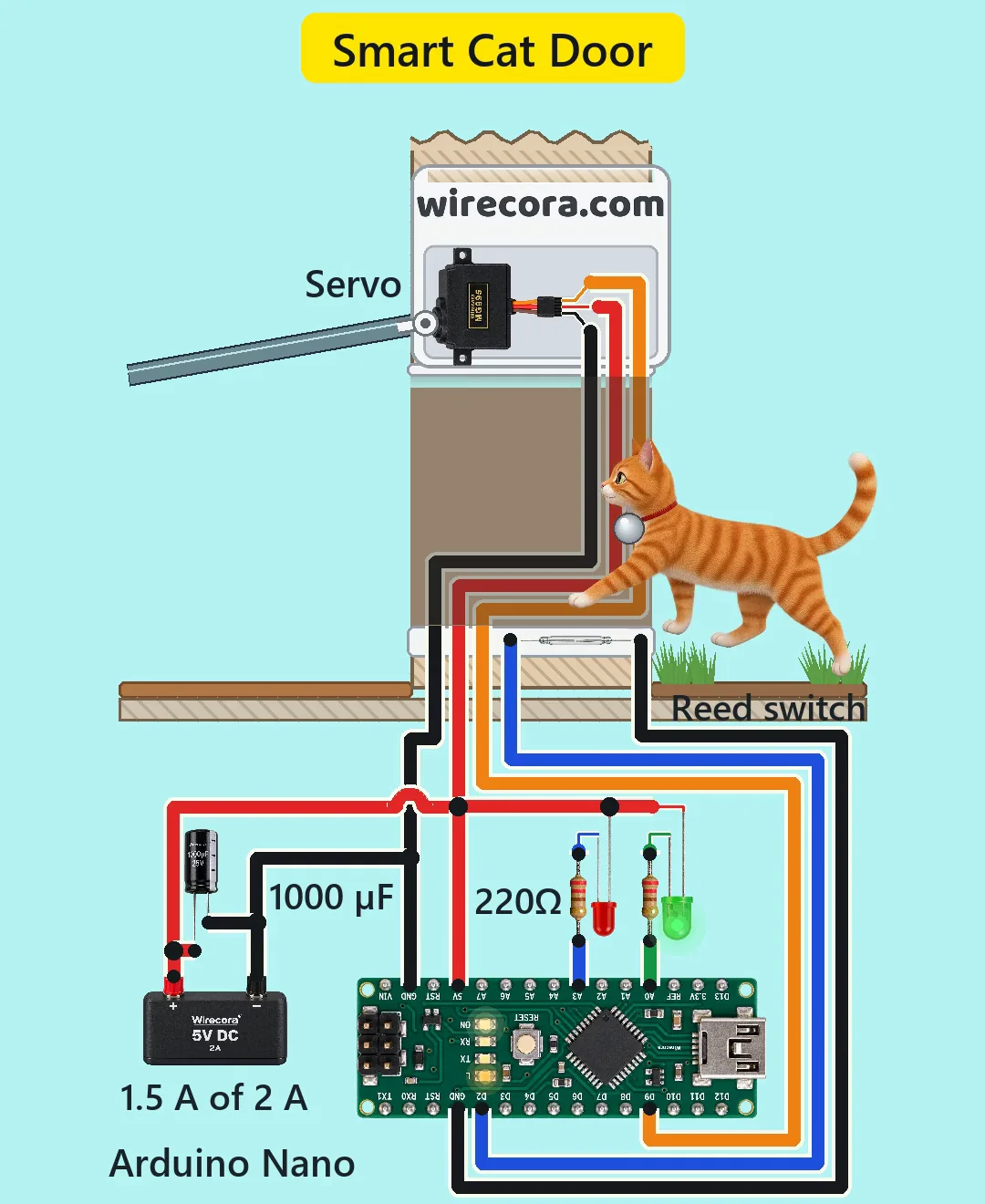
Parts
- Arduino Nano (ATmega328P, 5 V)
- Glass reed switch, normally open (SPST; switches up to 200 V or 0.5 A, 10 W at most); it has no plus or minus side
- Magnet tag on the collar: a strong neodymium disc (N52)
- MG995 servo, 4.8 to 7.2 V (brown wire GND, red wire +, orange wire signal)
- Green 5 mm LED (OPEN) and red 5 mm LED (LOCKED)
- Two 220 ohm resistors, 1/4 W (bands red, red, brown, gold)
- 1000 uF 25 V electrolytic capacitor across the supply (the stripe is the minus side)
- 5 V 2 A power supply
- A cat flap whose flap is fixed on the servo's shaft, so the servo is the hinge
How it is wired
- Supply plus (red) to the Nano's 5V pin (not VIN), the servo's red wire, the 1000 uF capacitor's long leg and the anodes (long legs) of both LEDs.
- Supply minus (black) to a Nano GND pin, the servo's brown wire and the capacitor's striped leg.
- Reed switch: one lead to D2, the other lead to a Nano GND pin. The Nano has a GND pin on each header; the two are joined on the board.
- Servo orange (signal) wire to D9.
- Green LED cathode (short leg) to a 220 ohm resistor, the resistor's other end to A0.
- Red LED cathode (short leg) to the other 220 ohm resistor, its other end to A3.
- The LEDs sink into the pins: an LED lights when its pin is LOW. The board's own L LED on D13 also lights while the door is open.
How it works
- D2 uses the Nano's built-in pull-up (20 to 50 k), so it reads HIGH while the reed is open. When the magnet tag comes close, the two thin metal blades inside the glass pull together and join D2 to GND, so D2 reads LOW. Only 0.1 to 0.25 mA flows through the reed.
- As soon as the sketch reads LOW it marks the door open and moves the servo 4 degrees every 20 ms: the flap swings up 80 degrees in 0.4 s (200 degrees a second, under the MG995's 300).
- Every LOW reading starts the 2 second count again. Two seconds after the tag has gone, the sketch moves the flap down 2 degrees every 20 ms, so it closes gently in 0.8 s.
- A0 goes LOW while the door is open, so the green LED lights; A3 goes LOW while it is shut, so the red LED lights. Each LED gets about 12 mA ((5 - 2.0 - 0.3) / 220), under the pin's 20 mA.
- With no tag, D2 stays HIGH and the servo keeps holding the flap at 0 degrees. The MG995's 8.5 kgf cm holds back a nose nudge.
- The servo can draw about 1.5 A when it starts or is blocked, so the worst case is about 1.53 A of the supply's 2 A. The supply carries that surge; the 1000 uF capacitor smooths the short dip on the 5 V line when the servo starts, which helps keep the Nano from resetting.
The code: cat_door.ino
The Arduino code for this circuit is in the Wirecora Discord, in the channel #arduino-code (owner’s choice, 14 October 2026: the code lives where you can ask about it). It is a plain .ino file you can download there.
The sketch from the Short's checked notes, simulated step by step against the video; it has not been run on a real board. It uses the Servo library that comes with the Arduino IDE.
What the video simplifies
- As drawn the door only lets the cat in: the only sensor is outside. To let it out, add a second sensor on the room side (a second reed or an IR sensor on another input), or let the flap swing out freely and use the servo only as a latch.
- The reed is drawn closing with the tag about 13 cm away. A small magnet closes a reed at only 1 to 2 cm, so a real build puts reeds along the side of the frame at collar height and uses a strong N52 tag.
- The door and flap are drawn about twice real size (a real cat flap is about 20 cm and 100 to 130 g), the tag about 6 cm (a real one is 2 to 3 cm), the wall about 45 cm thick, and the electronics much larger than the cat.
- A timer closes this door. A real door closes on a sensor or a longer timer so it never shuts on a slow cat.
- The servo alone holds about 0.3 to 0.7 kgf against a push, enough for a nudge but not for a determined raccoon. A real door adds a latch.
- Any strong magnet opens this door. Microchip cat doors fix that.
- The sketch sends the servo to 0 degrees, its end of travel. In a real build set the shut and open angles a few degrees inside the servo's range so it does not hum and draw current while the door is shut.
- The servo's wires are drawn along the tunnel's far wall; the animals pass in front of them.
- The cat trots faster than a real cat walks, the animals are moving pictures, and the sound is made, not recorded.
- The idea comes from Science Buddies' magnetic pet door project, which used a row of reeds with 10 k pull-down resistors. This version uses one reed and the Nano's built-in pull-up.
Everything runs on 5 V, so nothing here can shock you. The servo is strong enough to pinch: keep fingers, paws and tails clear of the flap while you test it. Keep the Nano and the supply indoors and dry. Strong neodymium magnets are dangerous if swallowed, so fix the tag firmly to the collar and keep spare magnets away from children and pets.
Build it yourself
The wiring board cannot run an Arduino program yet, so this one cannot be opened on it. Start with the guided first build on the wiring board, where a circuit really works as you wire it, then try the ready-made ones.
Your first circuit, step by stepAll circuits from the Shorts
Stuck, or built it?
Ask about this circuit or show your build in the Wirecora Discord. Questions get an answer every day.