Door-operated hall light with an Arduino Nano, a reed switch and an MG995 servo that presses the wall switch
You come in from the garage with a grocery bag in each hand and no hand free for the switch. As the door opens, a servo stuck beside the wall switch presses the top of the rocker and the hall light comes on before you are through the door. A while after the door has shut, the servo presses the bottom of the rocker and the light goes off. Nothing behind the switch plate is touched, and the switch still works by hand.
From the Short Open the Door and a Little Servo Flips the Light Switch (posted 25 October 2026). Opens on YouTube.
Parts
- Arduino Nano (ATmega328P, 5 V)
- Reed switch and magnet: a bare glass reed (closes when the magnet is near) or, better, a ready-made plastic door contact. Alarm shops call the right type a normally closed (NC) door contact: closed while the door is shut and the magnet sits next to it
- MG995 servo, 4.8 to 7.2 V, about 8.5 kg·cm (plug: brown = GND, red = +, orange = signal)
- 1000 uF 25 V electrolytic capacitor (the stripe is the minus side)
- Regulated 5 V 2 A USB power supply (with a USB breakout or a cut cable: red = +5 V, black = ground). It must be regulated: the Nano's 5V pin has no regulator in front of it
- A two-finger V horn for the servo: cut from a large servo horn or 3D-printed, two arms about 40 mm long at 80 degrees to each other, with a small rubber pad on each tip
- A small aluminium L bracket to hold the servo, fixed to the switch plate with strong double-sided mounting tape
- Your own wall switch: a single-pole rocker, the only switch for that light (a US Decora-style rocker in the video). It stays exactly as it is. On a 3-way pair (two switches for one light) the top of the rocker is not always ON, so this sketch would get out of step there
How it is wired
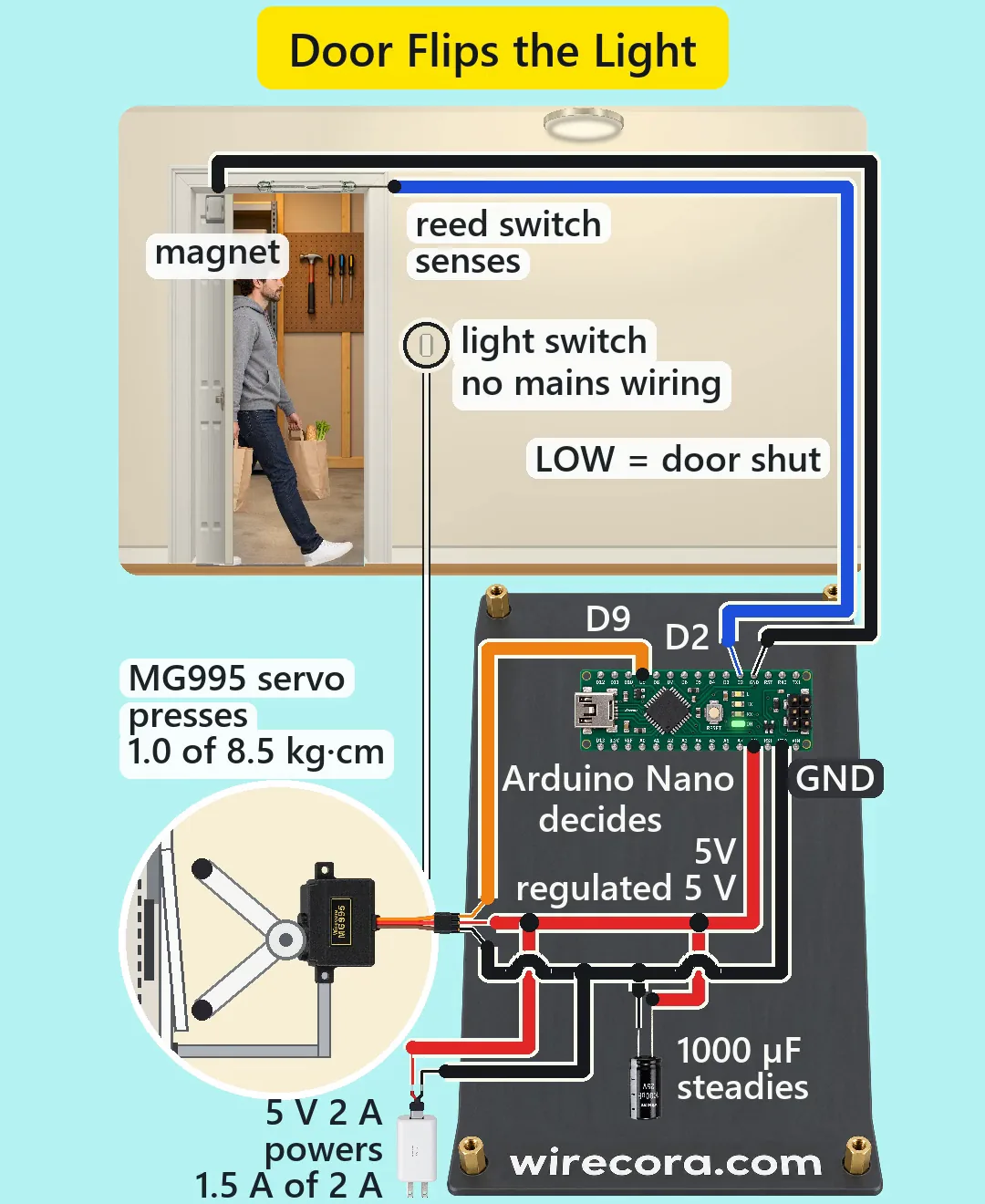
- Supply +5 V (red) to the Nano's 5V pin (bottom header), the servo's red wire and the 1000 uF capacitor's long leg. Leave VIN unused: it wants 7 to 12 V.
- Supply ground (black) to a Nano GND pin, the servo's brown wire and the capacitor's striped leg.
- Put the 1000 uF capacitor close to the servo plug, between its red and brown wires.
- Servo orange (signal) to D9.
- Reed switch: one lead to D2, the other lead to a Nano GND pin (the Nano has a GND pin on each header; they are joined on the board). It has no plus or minus side, and no resistor is needed: the sketch turns on the Nano's built-in pull-up.
- Mount the reed on the door frame above the latch side and the magnet on the top of the door, so they line up within about 1 cm when the door is shut. Run the reed wires along the frame and the baseboard, never across the door's swing.
- Mount the servo beside the switch with its shaft level and parallel to the wall, so the horn turns toward and away from the wall. At the middle angle (PARK) both rubber tips should stand about 2 mm clear of the rocker; turned one way the upper tip presses the top of the rocker, turned the other way the lower tip presses the bottom.
- Keep the bracket below the reach of the lower tip, so the horn never hits it.
How it works
- Door shut: the magnet holds the reed closed, so D2 is joined to GND and reads LOW. Door open: the magnet moves away, the reed opens, and the built-in pull-up (20 to 50 k) pulls D2 HIGH. Only 0.1 to 0.25 mA flows through the reed, far under its 0.5 A rating.
- The sketch reads D2 every 20 ms. With the door only about 1 degree open the reed lets go, and the next reading sends the servo to ON_PUSH (105 degrees). In about 0.05 s the upper tip pushes the top of the rocker past its middle, the rocker snaps over and the house's own switch turns the light on.
- The press is held for 0.3 s, then the horn goes back to PARK (90 degrees) and waits 0.2 s. At PARK neither tip touches the rocker, so you can still flip the switch by hand.
- Every HIGH reading while the door is open restarts the off timer. Once the door has been shut for OFF_DELAY, the servo goes to OFF_PUSH (75 degrees): the lower tip presses the bottom of the rocker and the light goes off. Then it is ready for the next opening.
- A single-pole rocker pressed on its top is on, whatever it was before, so the servo can never put the switch out of step with the sketch for more than one door cycle.
- Servo pulses (Servo library): PARK 1472 us, ON_PUSH 1626 us, OFF_PUSH 1317 us, all inside the MG995's 500 to 2500 us.
- Force: a rocker takes roughly 5 N about 2 cm from its pivot, about 1.0 kg·cm at the servo. The MG995 gives 8.5. An SG90 (1.8 kg·cm, plastic gears) would have little to spare.
- Current: a jammed MG995 draws about 1.5 A (measured figures run from 1.2 to 1.5 A; some sellers list up to 2.5 A), plus 19 mA for the Nano and 0.25 mA for the reed: 1.52 A of the supply's 2 A, and only for the 0.3 s press. If your servo's sheet says more, use a 5 V 3 A supply. The 1000 uF supplies a 1 A step for 1 ms with about a 1 V dip, which keeps the Nano from resetting when the servo starts.
- No flyback diode: the circuit switches no bare coil (no relay, no motor); the servo has its own driver. No relay either: the house switch keeps switching the mains load, the servo only presses it.
The code: door_light.ino
The Arduino code for this circuit is in the Wirecora Discord, in the channel #arduino-code (owner’s choice, 14 October 2026: the code lives where you can ask about it). It is a plain .ino file you can download there.
The sketch the Short was animated from, simulated loop by loop against the door in the video; it has not been run on a real board. It uses the Servo library that comes with the Arduino IDE. Set ON_PUSH and OFF_PUSH on your own switch, and OFF_DELAY to 120000 for two minutes.
What the video simplifies
- The light goes off 1.2 s after the door shuts so the clip fits; at home set OFF_DELAY to 120000 (2 minutes) or more.
- It only knows the door, so it can switch off with someone still in the hall. Add a PIR motion sensor (HC-SR501) on D3 and keep the light on while it sees movement.
- The switch is shown in a side-view close-up so you can see the rocker move. The servo is drawn side-on so its label and wires can be read; in a real build its shaft runs along the wall.
- The reed, the magnet and the electronics are drawn much larger than the hall. A real build uses a reed in a plastic door-contact housing; a bare glass reed is easy to break.
- The rocker's press force (about 5 N), its tilt (about 5 degrees each way) and the 15 mm distance at which the magnet lets the reed go are assumed. Set ON_PUSH and OFF_PUSH on your own switch, a few degrees at a time; which way the horn turns for 105 depends on the servo and how it is mounted.
- The sketch assumes the light is off when it powers up. If someone switches it on by hand, it goes off after the next door use.
- The original viral build used an IR obstacle sensor and an SG90. This version uses a reed and magnet (what door alarms use; light and paint cannot fool it), an MG995 and a two-finger horn so one servo switches on and off.
- The door closes by itself on spring hinges, as many US codes ask for doors from an attached garage into the house (adoption varies by town).
- The man is one drawing moved across the hall, the handle turns with no hand in view (he would press the lever with an elbow), car lights and steps fill the dark part, and all the sounds are synthesised.
- The sketch in the video description uses a division instead of the greater-than sign, which YouTube descriptions do not allow; the sketch here uses plain > and does the same thing.
- This circuit was checked by simulation and against the datasheets, not built.
Everything here runs on a regulated 5 V USB supply, and nothing touches the house wiring: do not take the switch plate off or open the wall box. The servo only presses the switch from outside. Never feed the Nano's 5V pin from anything but a regulated 5 V supply, and do not run the servo from the Nano's USB port alone while you program it. The horn moves fast and can pinch: keep fingers clear of the tips while it is powered. Test the angles with the servo loose first, so a wrong angle never jams the rocker. Run the cables along the baseboard so nobody trips, and do not rely on it for a light that must never go out, such as stairs at night.
Build it yourself
The wiring board cannot run an Arduino program yet, so this one cannot be opened on it. Start with the guided first build on the wiring board, where a circuit really works as you wire it, then try the ready-made ones.
Your first circuit, step by stepAll circuits from the Shorts
Stuck, or built it?
Ask about this circuit or show your build in the Wirecora Discord. Questions get an answer every day.