Phone-controlled smart desk with an ESP32, a ULN2003 and a relay
Tap Lamp on your phone and the desk lamp comes on with a relay click. Tap Fan and the desk fan spins up, tap Lights and the LED strip under the shelf glows, tap All off and the whole desk goes dark. The page on the phone is served by the ESP32 itself on your home Wi-Fi: no app, no cloud, no account, and it keeps working when the internet is down.
From the Short Tap My Phone: Desk Lamp, Fan and Shelf Lights Turn On (posted 21 October 2026). Opens on YouTube.
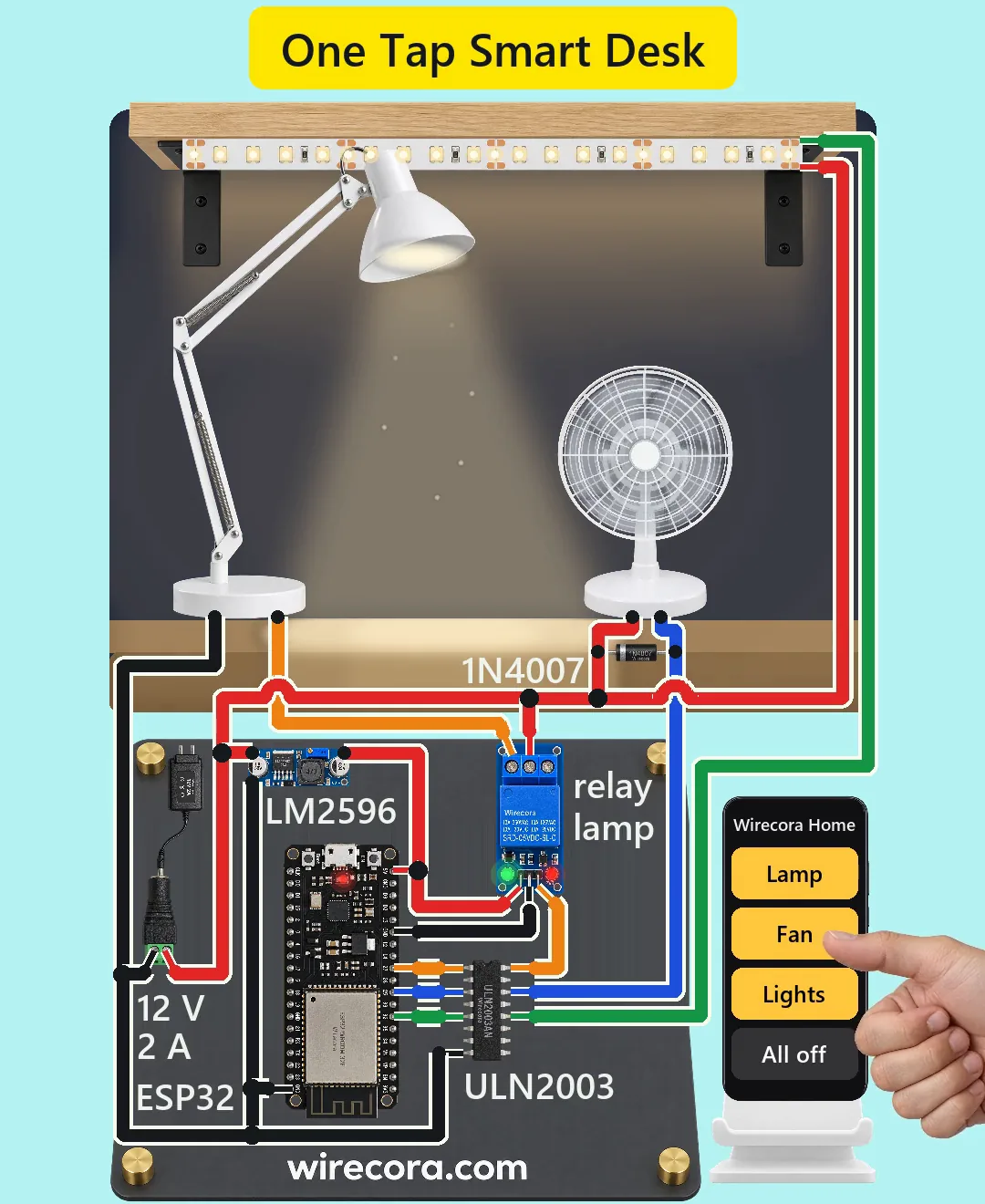
Parts
- ESP32-DevKitC V4 board (38 pins; the pins used are printed on the board: 5V, GND, 27, 25 and 32)
- ULN2003 Darlington driver chip, DIP-16 (7 channels, 500 mA each, 50 V; each input has its own 2.7 k resistor)
- 1-channel 5 V relay module with an SRD-05VDC-SL-C relay (header VCC, GND, IN; screw terminals NO, COM, NC; IN is active LOW; contacts 10 A at 30 V DC; the coil diode is on the module)
- LM2596 buck converter module (input 3.5 to 40 V, 1.5 A), its trimmer set to 5.0 V
- 1N4007 diode across the fan (flyback)
- Regulated 12 V 2 A adapter, centre positive, and a DC barrel jack to plug it into
- 12 V LED desk lamp, about 6 W (0.5 A)
- Small 12 V DC desk fan, about 0.18 A running (about 0.4 A for a moment at start)
- About 0.6 m of 12 V warm-white LED strip (0.24 A)
- A phone on the same Wi-Fi as the ESP32
- Recommended, not in the final video: a 1000 uF 25 V electrolytic capacitor across the 5 V rail, and a 2 A fuse in the 12 V lead
How it is wired
- Set the LM2596 first: power it from the 12 V adapter alone, measure its output and turn the trimmer until it reads 5.0 V. A new module often comes set near its input voltage, which would burn the ESP32.
- Jack + (centre pin, 12 V) to the LM2596 IN+, the relay module's COM terminal, the fan's + lead, the strip's + pad and the 1N4007's band (cathode).
- Jack minus is GND: to the LM2596 IN- (IN- and OUT- are joined inside the module), an ESP32 GND pin, ULN2003 pin 8 and the lamp's minus lead.
- LM2596 OUT+ (5 V) to the ESP32's 5V pin and the relay module's VCC. Relay module GND to another ESP32 GND pin (all GND pins on the board are joined). Leave the ESP32's USB unplugged while it runs from the 5V pin.
- ESP32 GPIO27 to ULN2003 pin 1 (IN1), GPIO25 to pin 3 (IN3), GPIO32 to pin 5 (IN5). The ULN2003's notch marks the pin 1 end.
- ULN2003 pin 16 (OUT1) to the relay module's IN. Relay NO terminal to the lamp's + lead; NC stays unconnected.
- ULN2003 pin 14 (OUT3) to the fan's minus lead and to the 1N4007's plain end (anode), so the diode sits across the fan with its band on the 12 V side.
- ULN2003 pin 12 (OUT5) to the strip's minus pad.
- ULN2003 pin 9 (COM) and the unused inputs and outputs stay unconnected. Every ground is joined.
- Recommended: the 1000 uF capacitor from 5 V to GND near the ESP32 (stripe on GND), and the 2 A fuse in the 12 V lead if you run long wires.
How it works
- Upload the sketch over USB with the LM2596's 5 V wire taken off the ESP32's 5V pin (the board must have only one power source). The ESP32 joins your Wi-Fi and prints its address on the serial monitor; you can also find it in your router's list of devices. Then unplug USB, put the 5 V wire back and power up from the adapter. Open that address on the phone (and add it to the home screen): the ESP32 sends a page with four buttons.
- Each button asks the ESP32 for /t?c=0, 1, 2 (toggle lamp, fan or lights) or /t?c=9 (all off). The ESP32 sets the matching pin to 3.3 V or 0 V and answers with the three states; the button turns yellow only when that answer arrives, so the screen never claims more than the ESP32 did.
- A 3.3 V pin cannot reliably drive a 5 V relay module, whose input must be pulled to ground. The ULN2003 does it: GPIO27 HIGH pushes about 0.7 mA into IN1, channel 1 turns fully on and pulls the relay's IN down to under 1 V, and the relay clicks on. ULN2003A inputs need under 2.4 V, and the ESP32 gives at least 2.64 V.
- The relay's contact joins 12 V to the lamp: 0.5 A of its 10 A rating. The relay keeps the lamp's current completely apart from the chip.
- The fan and the strip need less current, so ULN2003 channels 3 and 5 switch them directly by pulling their minus leads to ground: 0.18 A (0.4 A for a moment at start) and 0.24 A, each under the 0.5 A a channel can take. The chip drops about 1 V, so they get about 11 V: the fan runs a little slower, and the strip, whose LEDs already take about 9 V, draws only about two thirds of its current and glows noticeably dimmer than on 12 V directly. The chip warms by about 30 C (0.45 W).
- When the fan is switched off, its motor kicks back a voltage spike; the 1N4007 across it catches the spike and lets the current die away. The relay coil has its own diode on the module.
- Power: the LM2596 turns 12 V into 5 V for the ESP32 and the relay module, about 0.33 A at worst (Wi-Fi transmit peaks of about 0.24 A, the 71 mA coil and about 20 mA for the module's input and LEDs) of its 1.5 A. With everything on, the adapter gives about 1.1 A of its 2 A (1.3 A while the fan starts).
- Before the sketch starts, the ESP32 pins float; the ULN2003's own input resistors keep all channels off, so nothing switches on at power-up.
The code: phone_smart_desk.ino
The Arduino code for this circuit is in the Wirecora Discord, in the channel #arduino-code (owner’s choice, 14 October 2026: the code lives where you can ask about it). It is a plain .ino file you can download there.
The full sketch from the Short's checked notes, with the phone page inside it (the YouTube description only has the core). It is for the ESP32 Arduino core and uses the WiFi and WebServer libraries that come with it. Put in your Wi-Fi name and password. It was checked step by step against the video, not run on a real board.
What the video simplifies
- The viral original had an 8-relay board on a breadboard. The plan for this Short was three relay modules, but that could not be drawn without many crossing wires, so the video uses one relay for the lamp and lets the ULN2003 switch the fan and the strip directly.
- The video has no capacitor on the 5 V rail: the LM2596 module's own output capacitor carries it. A 1000 uF capacitor across 5 V is cheap insurance against Wi-Fi current bursts, so this page recommends it.
- The LM2596's 5.0 V setting is not shown on screen; set and measure it before connecting the ESP32.
- The relay module's ground is drawn to a different ESP32 GND pin than the rest; all GND pins on the board are one copper area, so it is one ground.
- The Wi-Fi round trip is assumed to be 0.15 s; on a busy network it can take longer.
- The lamp, fan and strip currents are typical values, not measured.
- The fan's speed is modelled: it stops in 1.5 s in the video, while a real desk fan coasts for 2 to 4 s.
- The light from the lamp and the strip is drawn brighter and softer than a camera would see it.
- The phone and the electronics are drawn larger than the desk, at their own scales.
- The clicks, the fan and the taps are synthesised sounds. The circuit was checked against datasheets only, not built.
Everything runs on 12 V DC from a regulated adapter, so nothing here can shock you. Keep mains out of this build: the relay is rated for mains, but mains wiring belongs in a closed, fused box done by someone qualified. Set the LM2596 to 5.0 V before the ESP32 is connected, and never plug in the ESP32's USB while it is fed on the 5V pin. The ULN2003 gets warm with the fan and strip on; do not cover it. Add a 2 A fuse in the 12 V lead if your wires are long. Anyone on your Wi-Fi can open the page, so keep this build on a home network you trust.
Build it yourself
The wiring board cannot run an ESP32 program or serve a Wi-Fi page yet, so this one cannot be opened on it. Start with the guided first build on the wiring board, where a circuit really works as you wire it, then try the ready-made ones.
Your first circuit, step by stepAll circuits from the Shorts
Stuck, or built it?
Ask about this circuit or show your build in the Wirecora Discord. Questions get an answer every day.