Fingerprint door lock with an Arduino and an R503
Touch the sensor's ring with an enrolled finger: about half a second later the ring turns blue, the relay clicks and the solenoid pulls its bolt back, so the little door swings open with a push. After 2.2 s the bolt springs out again. A finger the sensor does not know gets two red flashes on the ring and one short buzz, and the bolt stays in.
From the Short Fingerprint Unlocks This Little Door in Half a Second (posted 19 October 2026). Opens on YouTube.
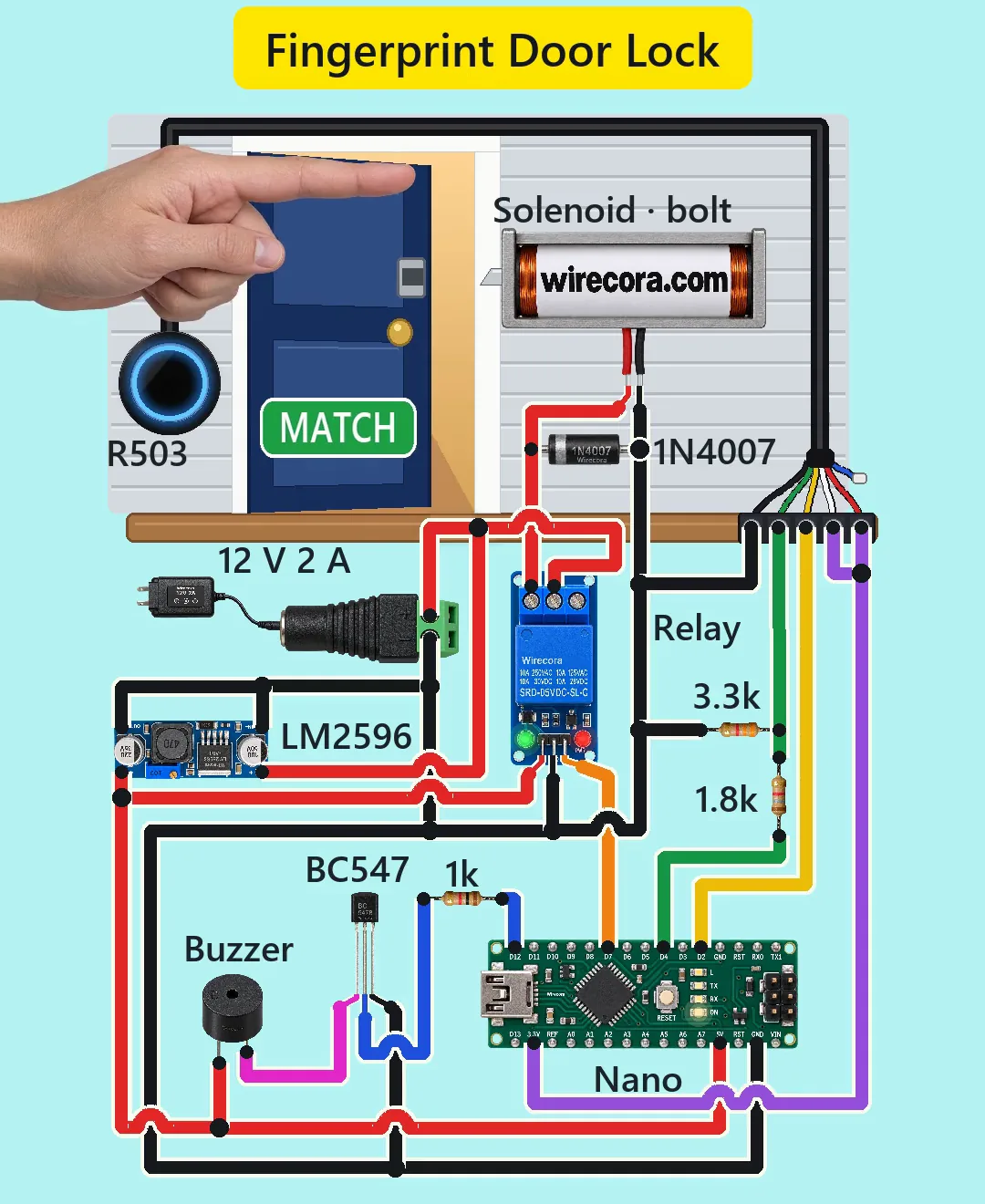
Parts
- Arduino Nano (an Uno works the same)
- R503 round fingerprint sensor, 3.3 V only, about 20 mA, six wires: 1 red VCC, 2 black GND, 3 yellow TXD, 4 green RXD, 5 blue WAKEUP, 6 white 3.3VT (touch supply). The wire colours vary between batches, so check the sheet that comes with yours.
- 12 V lock-style solenoid with a slanted bolt (about 650 mA at 12 V, made to be on for 1 to 10 s at a time), red and black leads
- 5 V relay module, low-level trigger (active LOW), pins VCC, GND, IN, contacts NO, COM, NC (SRD-05VDC-SL-C relay, contacts 10 A at 30 V DC, about 75 mA with its LEDs)
- 1N4007 diode, the flyback diode across the solenoid
- LM2596 buck module (in 3.5 to 40 V, up to 1.5 A out), set to 5.0 V
- 12 V 2 A adapter (barrel tip = plus) and a DC barrel jack with screw terminals
- Active 5 V buzzer (sounds a steady 2.3 kHz tone by itself on 5 V, about 30 mA)
- BC547 NPN transistor (flat face towards you, legs down: C, B, E from the left)
- 1k resistor for the transistor's base (bands brown, black, red, gold)
- 1.8k and 3.3k resistors for the 5 V to 3.3 V divider (bands brown, grey, red, gold and orange, orange, red, gold)
- A door with a steel keeper plate for the bolt (the Short uses a desk model)
How it is wired
- Adapter into the DC jack. Jack plus (+12 V) to the LM2596 IN+ and to the relay's COM contact.
- Before anything else is connected, power the LM2596 and turn its trimmer until a meter reads 5.0 V at OUT+ (a new one can give about 11 V).
- LM2596 OUT+ (5 V) to the Nano's 5V pin, the relay module's VCC and the buzzer's plus (long) leg. Nano VIN stays free.
- Ground: jack minus, LM2596 IN- and OUT-, a Nano GND pin, relay GND, the R503's black wire, the solenoid's black lead, the 1N4007's plain end, the BC547 emitter (E) and one end of the 3.3k. One common ground.
- Relay NO to the solenoid's red lead. Relay NC is left free.
- The 1N4007 across the solenoid's two leads: band (cathode) on the red lead, plain end on the black lead.
- Nano 3.3V pin to the R503's red (VCC) and white (3.3VT) wires.
- R503 yellow (TXD, the sensor's output) to Nano D2.
- Nano D4 to the 1.8k; the other end of the 1.8k to the R503's green (RXD) wire and to the 3.3k, whose other end goes to ground.
- R503 blue (WAKEUP) is not used: insulate its end.
- Nano D7 to the relay module's IN.
- Nano D12 to the 1k; the other end of the 1k to the BC547 base (B); the BC547 collector (C) to the buzzer's minus (short) leg.
How it works
- The R503 keeps the enrolled fingerprints inside itself. When a finger is on the glass, the Nano asks it over serial (57600 baud) to take a picture and search its memory; the sensor answers match or no match in well under a second.
- On a match the sketch sets the ring to steady blue and pulls D7 LOW. The relay board switches on when IN is LOW, so its NO contact closes and joins +12 V from COM to the solenoid. The coil pulls the bolt back out of the keeper and the door can be pushed open.
- After 2.2 s D7 goes HIGH again, the relay lets go and a spring inside the solenoid pushes the bolt out. Its slanted face lets the door click shut past it. 2.2 s is well inside the 1 to 10 s the solenoid is made for.
- When the relay opens, the coil tries to keep its current flowing and would kick up a high voltage spike. The 1N4007 gives that current a path round the coil, so the relay contacts do not spark. It is wired backwards to the supply, so it carries nothing while the solenoid is on.
- No match: the ring flashes red twice, D12 goes HIGH for 0.3 s and the BC547 switches the buzzer on. The buzzer takes about 30 mA, more than the 20 mA a Nano pin should give, so D12 only feeds the base: (5 - 0.7) / 1k = 4.3 mA, far more than the 0.27 mA the transistor needs to pass 30 mA.
- The R503 runs on 3.3 V. Its yellow output gives 3.3 V, enough for the Nano (an input reads HIGH above 3.0 V at 5 V). The Nano's D4 gives 5 V, so the 1.8k and 3.3k bring it down: 5 x 3.3 / 5.1 = 3.24 V into the sensor's green input.
- The sketch writes the relay pin HIGH before it makes it an output, so the door does not unlock for a moment at power-up.
- Currents: the 5 V side takes about 150 mA of the LM2596's 1.5 A; the 12 V side 0.65 A for the solenoid plus about 0.07 A for the buck: 0.72 A of the adapter's 2 A. The relay contacts carry 0.65 A of their 10 A.
- The LM2596 is there so the Nano does not have to burn 12 V down to 5 V on its own: on VIN its small regulator would turn about (12 - 5) V x 0.14 A = 1 W into heat.
The code: fingerprint_lock.ino
The Arduino code for this circuit is in the Wirecora Discord, in the channel #arduino-code (owner’s choice, 14 October 2026: the code lives where you can ask about it). It is a plain .ino file you can download there.
The sketch the Short was animated from, replayed step by step against the touches drawn in the video; it has not been run on a real board yet. It needs the Adafruit Fingerprint Sensor Library (Sketch, Include Library, Manage Libraries); SoftwareSerial is built in. Enroll your fingers first with the library's enroll example, after changing its SoftwareSerial line to (2, 4) to match this wiring. On a clone Nano (CH340) the 3.3V pin is weak: if the sensor keeps resetting, feed it from an AMS1117-3.3 regulator instead.
What the video simplifies
- It is a desk model of a front door, about 10 cm wide. The electronics are drawn much larger than the model, the solenoid about as wide as the door and the R503 about 1.5 times its 28 mm.
- The half second from touch to match is taken from the sensor's stated speed (under 0.3 s for the search), not measured.
- The bolt's speed, the short delay when it springs out and the spring hinge that closes the door are assumed.
- The ring's breathing speed (one breath a second) and its flash speed are set to look clear; the colours follow the sketch.
- The finger pushes the door at its top corner so the hand covers no part; the hallway behind the door is drawn.
- The second person's hand is the same hand recoloured.
- The buzz in the video is softer and lower than a real active buzzer's 2.3 kHz tone, and the clicks and the clack are synthesised.
- The video this one remakes showed red and green LEDs; this one uses the sensor's own ring as the status light, and it includes a flyback diode, a transistor for the buzzer, a divider into the 3.3 V sensor and a 5 V buck.
- This circuit was checked against the datasheets and in a simulation of the sketch, not built.
Everything runs on 12 V and 5 V DC from the adapter. Set the LM2596 to 5.0 V with a meter before you connect the Nano, and never put 5 V on the R503: it is a 3.3 V part. Do not keep the solenoid powered for long, it gets hot. This is a demo, not a secure lock: the sensor, cable and relay sit outside the door and a copied fingerprint or a shorted relay gets past it. The lock stays shut with no power (fail-secure), so a real door also needs a mechanical way out from inside.
Build it yourself
The wiring board cannot run an Arduino program yet, so this one cannot be opened on it. Start with the guided first build on the wiring board, where a circuit really works as you wire it, then try the ready-made ones.
Your first circuit, step by stepAll circuits from the Shorts
Stuck, or built it?
Ask about this circuit or show your build in the Wirecora Discord. Questions get an answer every day.