Model garage door that opens for a car, with an Arduino Nano, an HC-SR04 and an L298N
A car rolls up the driveway. When it is closer than 150 cm the roller door opens by itself and stops at the top. The car drives in past an IR sensor in the doorway, and 0.6 s after it has passed, the door rolls down and stops on the floor. If anything is in the doorway while it closes, it opens again. It is a 1:10 model on 12 V, not a real garage door.
From the Short This Garage Door Opens When Your Car Pulls Up (posted 21 October 2026). Opens on YouTube.
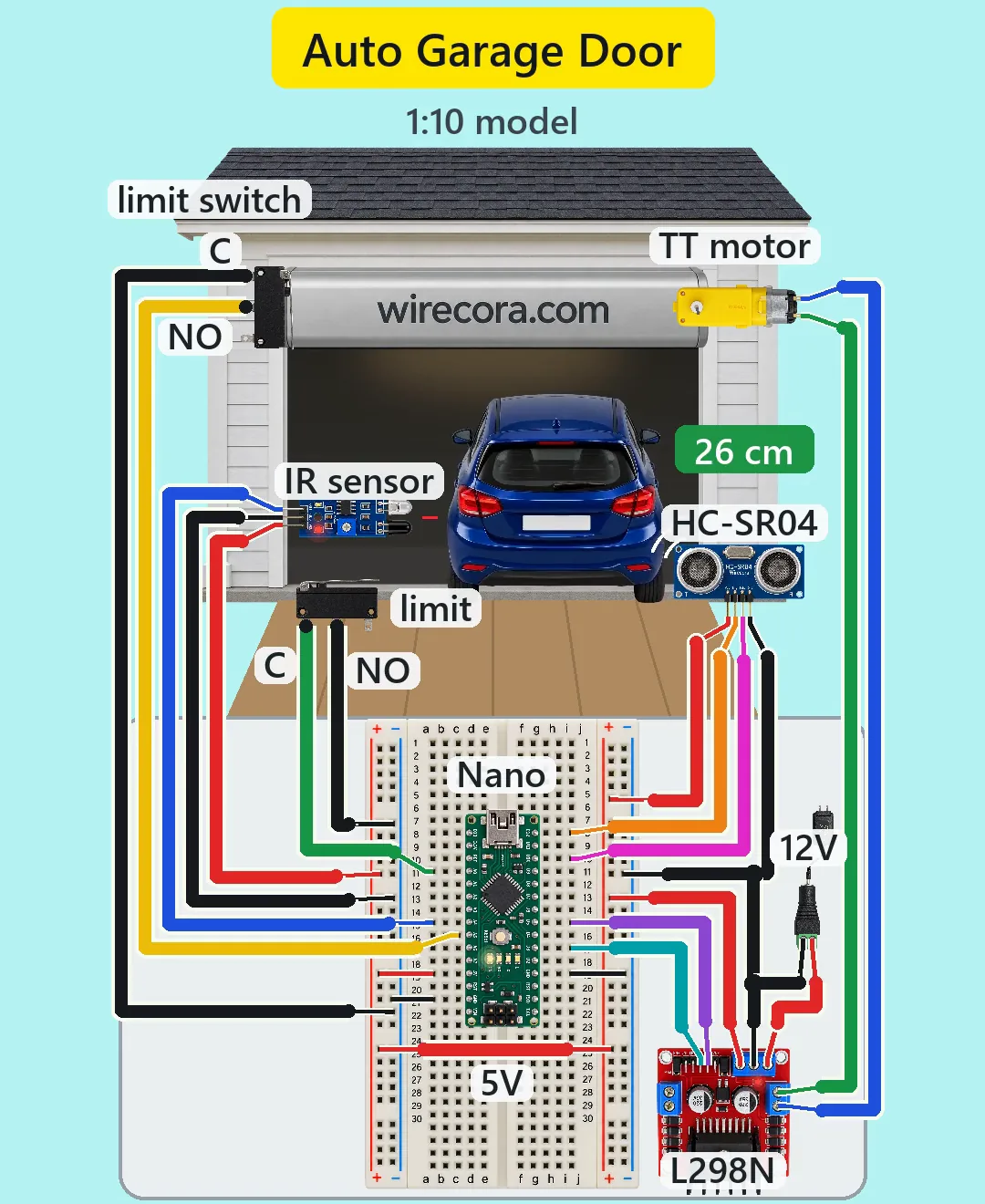
Parts
- Arduino Nano, 5 V (an Uno works the same with the same pin numbers)
- Half breadboard (30 rows, with + and - rails on both sides) and jumper wires
- HC-SR04 ultrasonic sensor, 5 V, about 15 mA, pins VCC, TRIG, ECHO, GND
- FC-51 IR obstacle sensor, pins OUT, GND, VCC (OUT goes LOW and its green LED lights while something is in front of it; a trimmer sets the range)
- L298N motor driver board (L298 dual H-bridge with a heatsink, a 78M05 5 V regulator, eight flyback diodes and two 220 uF 35 V capacitors on the board)
- TT gear motor, 3 to 6 V, 1:48 gearbox (not polarised)
- Two lever microswitches, KW11 / Omron SS type, terminals C (hinge end), NO (middle) and NC (far end). A gold-contact (0.1 A) version is the datasheet choice for a signal; common ones work
- 12 V 2 A DC adapter (centre positive) and a DC barrel jack with screw terminals
- The model: a 1:10 garage front with a 26 cm opening and a light roller door (about 60 g, the numbers here assume that), wound on a drum of about 0.8 cm radius at the top that the motor turns, and a bar along the door's bottom edge that presses the switches
How it is wired
- Adapter into the barrel jack. Jack + (red) to the L298N 12V terminal, jack - (black) to the L298N GND terminal. Leave the ENA jumper and the 5V jumper on the L298N as shipped, so its own regulator makes 5 V.
- L298N +5V to the + rail on the right side of the breadboard, L298N GND to the - rail on the right. A red jumper joins the right + rail to the left + rail below the Nano (the 5V link in the Short).
- Nano across the middle of the breadboard, USB end up. Nano 5V pin to the left + rail, the Nano GND pin on the A side to the left - rail, the GND pin on the D side to the right - rail. Leave VIN unused and never put 12 V on the 5V pin. If you plug in USB to upload with the adapter unplugged, the USB 5 V feeds the sensors too; that is harmless, and the motor runs only with the adapter in.
- All grounds are one: as drawn, the two - rails meet through the Nano's two GND pins (they are joined on the Nano). A second jumper between the two - rails does no harm and makes the ground sure.
- IR sensor: VCC (red) to the left + rail, GND (black) to the left - rail, OUT (blue) to A4.
- Top limit switch: C (black) to the left - rail, NO (yellow, the middle tab) to A5. NC stays unused.
- Bottom limit switch: NO tab (black) to the left - rail, C tab (green) to A0. It is one contact, so either side can be the grounded one. NC stays unused. Check with a meter that C and NO close only while the lever is pressed.
- HC-SR04: VCC (red) to the right + rail, TRIG (orange) to D12, ECHO (pink) to D10, GND (black) to the right - rail.
- L298N IN1 (purple) to D5, IN2 (teal) to D3. OUT1 to one motor terminal, OUT2 to the other. If the door goes down when it should go up, swap the two motor wires.
- Each signal wire goes into the breadboard hole in the same row as its Nano pin, so no wire has to cross the board.
- Mounting: the top switch where the door's bar (or a small striker on it) pushes the lever toward the switch body just before the bar reaches the roller box; the bottom switch on the floor under the bar; the IR sensor low on the inside of the doorway jamb, a few cm deeper than the door, its trimmer set to about 10 cm and aimed so the closing bar does not trigger it; the HC-SR04 on the pier at bumper height, looking down the driveway.
How it works
- About every 75 ms the sketch sends a 10 microsecond ping on TRIG and times the echo on ECHO: echo time in microseconds divided by 58 is the distance in cm. It also reads the IR sensor and both switches. The three inputs use INPUT_PULLUP, so a pressed switch or an IR sensor that sees something pulls its pin LOW.
- Door closed: the first reading between 2 and 150 cm starts the motor up. IN2 goes LOW and IN1 gets PWM 135. In the Short the car reads 146 cm at 0.225 s and the door starts.
- The L298N drops about 1.4 to 2 V, so from 12 V the bridge gives about 10 to 10.6 V (up to 11.2 V if the adapter gives 12.6 V), and PWM 135 gives the motor 135/255 of that: about 5.3 to 5.9 V on average, at or under the TT motor's 6 V. The door rises about 13 cm a second and is fully open in about 1.1 s.
- When the top switch closes, both IN pins go LOW: the L298 shorts the motor, a fast stop. A shorted motor only brakes while it turns; the friction of the 1:48 gearbox is what keeps the light door up (a real door uses a spring). If the switch never closes, the motor stops anyway after 2.5 s.
- While the car crosses the doorway the IR sensor's OUT is LOW and the sketch notes the time. 0.6 s after the beam is clear again the door starts down. If the door opened and no car crossed the beam, it closes after 20 s.
- Going down, IN2 goes HIGH and IN1 gets PWM 145. While IN1 is low the bridge drives the motor backwards; while it is high both inputs are high, which is the L298's other fast stop. So it drives back 110/255 of the time, about 4.3 to 4.8 V, and the door comes down at about 10.5 cm a second, in about 1.4 s.
- If the IR sensor sees something while the door is closing, the door goes back up. The bottom switch stops it on the floor (or the 2.5 s limit does).
- Power: the 5 V side (Nano, HC-SR04, IR sensor and the L298's logic) takes about 0.12 A from the L298N's 78M05 regulator, which turns about 0.8 W into heat and gets hot. Use a separate 5 V supply if you add more 5 V parts. The whole build takes about 0.4 A of the adapter's 2 A, and the L298 itself makes about 1.3 W of heat, which its heatsink handles.
- The eight diodes on the L298N board catch the motor's voltage kicks (flyback). Of its two 220 uF capacitors, one smooths the 12 V and the other the 5 V from its regulator.
- Why an L298N and not a relay: the door has to run both ways, and an H-bridge reverses the motor. Why a TT motor and not a 12 V wiper motor: a wiper motor draws 2 to 4 A, more than the L298N's 2 A per channel; a light model door needs only about 6 % of the TT motor's stall torque.
The code: garage_door.ino
The Arduino code for this circuit is in the Wirecora Discord, in the channel #arduino-code (owner’s choice, 14 October 2026: the code lives where you can ask about it). It is a plain .ino file you can download there.
The sketch the Short was animated from, simulated pass by pass against the car in the video; it has not been run on a real board yet. No libraries needed. If the door runs the wrong way, swap the two motor wires; if it stops short or runs into the box, move the switches rather than the numbers.
What the video simplifies
- The IR beam and the ultrasonic pings are drawn so you can see them; both are invisible.
- There is no display in the circuit: the distance tag (180, 146, 26 cm) is drawn once per pass of the sketch. It follows the car right to the door, while a real HC-SR04 beside the doorway loses the car in the last 25 cm.
- The FC-51 is a reflective sensor (it sees light bounced back within its set range), not a two-part beam like a real opener's safety beam.
- The sensors and switches are drawn in front of the door so they can be seen; in a build they sit on the inside face of the jamb. The switch levers are drawn still.
- The motor's shaft is drawn end-on; in a build it sits on the drum's axis.
- The electronics, the adapter and the motor are drawn at their own scale, much larger than the 1:10 garage and car.
- The L298N picture shows its ENA jumper cap one position off; on your board leave the cap on ENA as shipped.
- The 60 g door, the drum size, the gearbox holding the open door, and the motor's running (about 0.23 A) and stall currents are assumed. Stall peaks can pass 2 A for a moment. The bar may settle up to 0.8 cm after the bottom switch closes, because the sketch checks once every 75 ms.
- The car that parked is not shown when the door opens again for the next car, so the clip loops. The scene is on a light background, and the sounds are synthesised.
- It opens for any car, and for a person or a bin closer than 150 cm. If a car waits in front without driving in, the door closes after 20 s and then opens again at once. A real build adds a tag check (RFID or Bluetooth); real openers also have a two-part safety beam and a force limit.
- This circuit was checked by simulation and against the datasheets, not built.
Everything runs on a 12 V DC adapter; no mains wiring. Never put 12 V on the Nano's 5V pin, and keep fingers off the L298N's heatsink and regulator, which get hot. Even a model door can pinch: keep fingers away from the drum and the door edge while it runs, and unplug the adapter before you reach into the mechanism. This is a model only: never connect it to a real garage door or a real opener, which are mains powered and heavy enough to injure.
Build it yourself
The wiring board cannot run an Arduino program yet, so this one cannot be opened on it. Start with the guided first build on the wiring board, where a circuit really works as you wire it, then try the ready-made ones.
Your first circuit, step by stepAll circuits from the Shorts
Stuck, or built it?
Ask about this circuit or show your build in the Wirecora Discord. Questions get an answer every day.