Joystick pan-and-tilt camera with an Arduino and two SG90 servos
Push the thumb stick and the camera's lens follows it: left, right, up and down. Let go and the stick springs back to the middle, and the camera looks straight ahead again. Two small servos turn the camera: one turns it left and right (pan), the other tips it up and down (tilt).
From the Short Joystick Moves a Security Camera: Pan and Tilt | Arduino (359K views, posted 14 October 2026). Opens on YouTube.
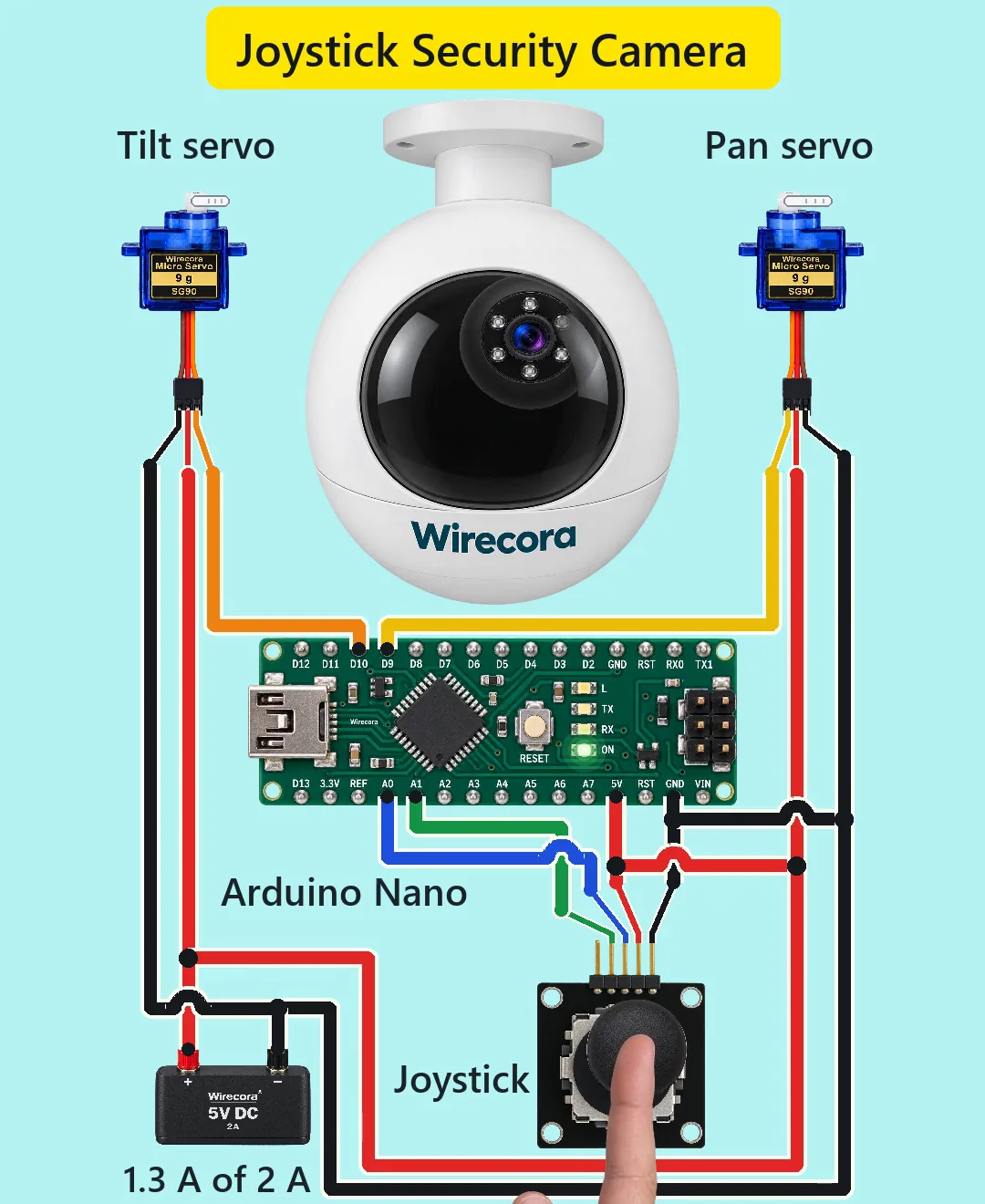
Parts
- Arduino Nano (an Uno works the same)
- KY-023 joystick module: two pots of about 10 k (some makers use 5 k) and a push switch; header GND, +5V, VRx, VRy, SW
- 2 x SG90 micro servo (brown GND, red + in the middle, orange signal; rated 4.8 V, fine on 5 V; up to about 0.65 A each when stalled)
- 470 to 1000 uF electrolytic capacitor, 10 V or more (the stripe is the minus side). Not drawn in the Short, but add it.
- Regulated 5 V 2 A supply
- A pan-tilt bracket for two SG90 servos, and a light camera that has its own power and video
How it is wired
- Supply plus (5 V) to the Nano's 5V pin, the joystick's +5V and both servos' red wires.
- Supply minus to a Nano GND pin, the joystick's GND and both servos' brown wires. One common ground.
- Joystick VRx to Nano A0, VRy to A1. SW is not used.
- Nano D9 to the pan servo's orange wire; Nano D10 to the tilt servo's orange wire.
- Put the capacitor across the supply where the servo wires join it: plus (long leg) to 5 V, stripe to ground. It covers the servos' current bursts so the Nano's 5 V does not dip.
- Nano VIN stays free. Unplug the 5 V supply before you plug in USB to upload the sketch.
- On the bracket, the pan servo turns the base and the tilt servo rides on it and tips the camera.
How it works
- Each axis of the joystick is a pot between +5V and GND. Its middle pin (the wiper) gives 0 to 5 V, and about 2.5 V with the stick in the middle. The Nano reads that as a number from 0 to 1023 (about 512 in the middle).
- map() turns each reading into a servo angle: pan 30 to 150 degrees from A0, tilt 60 to 120 degrees from A1. Stick in the middle gives about 90 and 90: the camera looks straight ahead.
- The camera follows the stick's position, not its speed: hold the stick to one side and the camera stays turned; let go and the stick's spring brings both back to about 90.
- The loop runs about every 15 ms, 66 times a second. The Servo library sends each servo a pulse 50 times a second, and the pulse width sets the angle.
- An SG90 can turn 60 degrees in 0.1 s. In the Short the camera turns at up to about 113 degrees a second, so the servos keep up easily.
- Worst case, both servos stalled: 2 x 0.65 A + about 20 mA for the Nano and the joystick = 1.32 A of the supply's 2 A. A computer USB port gives only 0.5 A: on USB the servos jitter and the Nano can reset.
- Seen from the Nano's analog input, each wiper is a source of at most 2.5 k (stick in the middle; 1.25 k with a 5 k pot), well under the 10 k or less the input is made for.
- The servos have their own motor driver inside, so no flyback diode is needed.
The code: joystick_camera.ino
The Arduino code for this circuit is in the Wirecora Discord, in the channel #arduino-code (owner’s choice, 14 October 2026: the code lives where you can ask about it). It is a plain .ino file you can download there.
The sketch the Short was animated from (also in the Short's description), run pass by pass in a simulation against the stick movement drawn in the video; it has not been run on a real board yet. It uses the built-in Servo library. If pan and tilt come out swapped, swap A0 and A1; if a direction is reversed, swap the last two numbers in that map() call.
What the video simplifies
- The dome camera is a prop: its own power and video are not shown. A bought PTZ camera turns with stepper motors, not hobby servos; this build is two SG90s on a pan-tilt bracket.
- The servos are drawn beside the camera and nothing links their arms to the lens. The lens moves the same distance for 60 degrees of pan as for 30 degrees of tilt.
- The servo arms are drawn as bars seen edge-on.
- The pan servo is shown from its other side, so its plug reads orange, red, brown. The D9 wire is drawn yellow to tell it from the D10 wire; both go to the servos' orange signal wires.
- Which stick direction is VRx depends on how the module is turned. If pan and tilt come out swapped, swap A0 and A1 in the sketch; if a direction is reversed, swap the last two numbers in that map() call.
- The thumb cap slides on screen instead of tilting.
- The 470 to 1000 uF capacitor is not drawn in the Short.
- The electronics are not drawn to scale with the camera or the hand.
- The servos are heard only at their fastest moments; the sounds are synthesised.
- The viral original used a Particle Photon; this one uses an Arduino Nano and a 5 V 2 A supply.
- The 0.65 A stall current is a typical figure; quoted figures for SG90s and their clones run from about 0.3 to 0.75 A. Even at 0.75 A each, both together stay under the 2 A supply.
- This circuit was checked by simulation and against the datasheets, not built.
Everything runs on 5 V from a regulated supply. Never put a battery or anything above 5.5 V on the Nano's 5V pin, and unplug the supply before you plug in USB. Do not run the servos from the Nano's USB power. If you point a working camera at a street or a neighbour's garden, check your local rules on filming (in the EU and the UK, data protection law applies).
Build it yourself
The wiring board cannot run an Arduino program yet, so this one cannot be opened on it. Start with the guided first build on the wiring board, where a circuit really works as you wire it, then try the ready-made ones.
Your first circuit, step by stepAll circuits from the Shorts
Stuck, or built it?
Ask about this circuit or show your build in the Wirecora Discord. Questions get an answer every day.