Keypad code door with an Arduino, an MG995 servo and a reed switch
Type a wrong four-digit code and the screen says WRONG CODE, the buzzer buzzes and the backlight blinks. Type 4-7-8-9 and the screen says OPEN, a servo under the hinge swings the little door 75 degrees open, and 1.2 s later it closes it again slowly. A reed switch on the frame tells the Arduino the door is really shut, and the screen says CLOSED. Three wrong codes in a row lock the keypad for 30 s. It is a code door, not a lock: see below.
From the Short Wrong Code Buzzes, Right Code Swings the Door Open (posted 22 October 2026). Opens on YouTube.
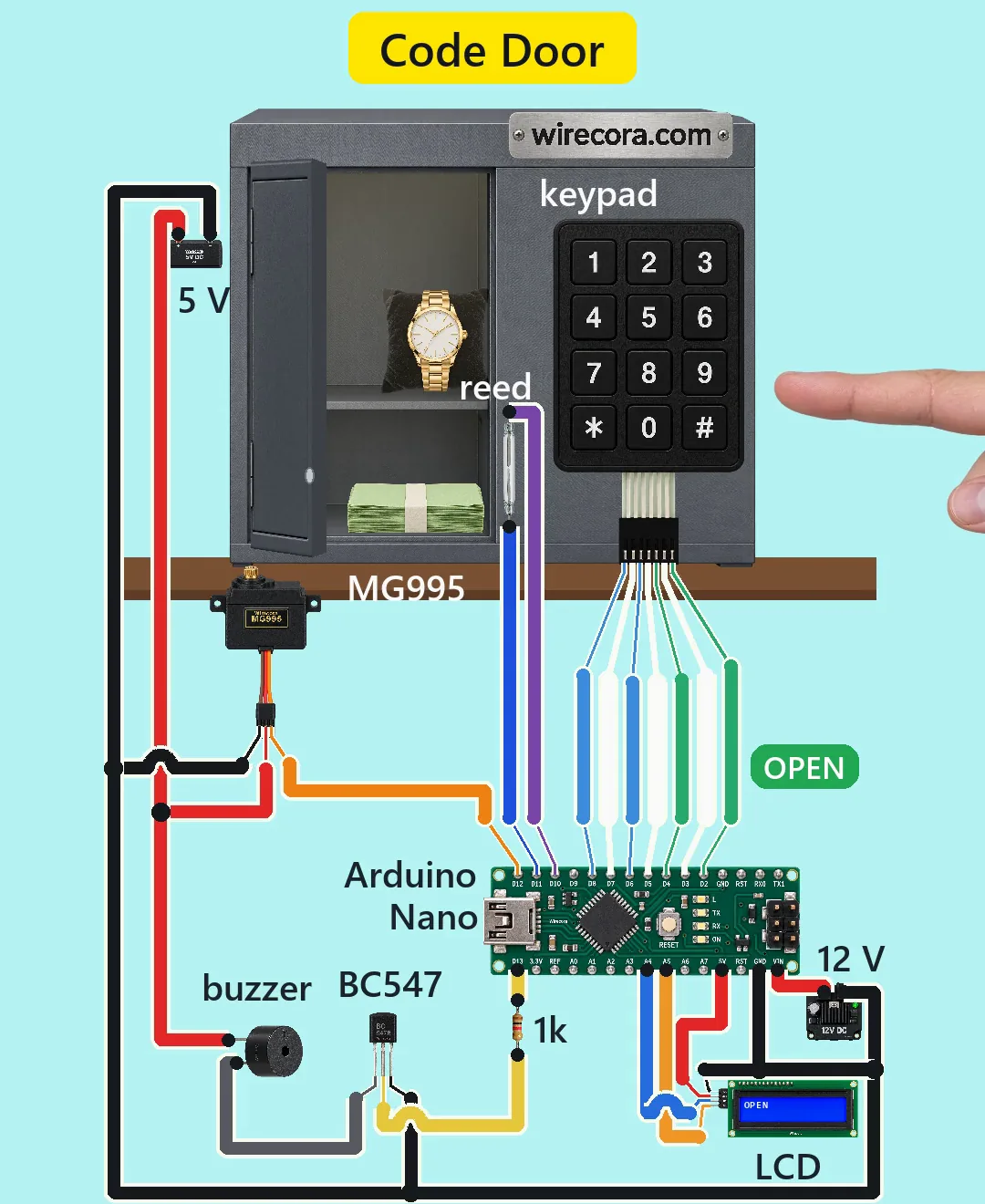
Parts
- Arduino Nano (an Uno works the same)
- 3x4 membrane keypad (keys 1 to 9, *, 0, #) with a 7-pin ribbon: R1 R2 R3 R4 C1 C2 C3 from the left on most of them, but check the sheet or the listing for yours
- LCD1602 with an I2C backpack (PCF8574), pins GND, VCC, SDA, SCL; address 0x27, some are 0x3F
- MG995 servo (metal gears, 8.5 kg.cm, about 1.5 A when it stalls), wires brown GND, red +5 V, orange signal
- Reed switch (normally open) and a small bar magnet, or a ready-made door-sensor pair such as an MC-38
- Active 5 V buzzer (it makes its own 2.3 kHz tone on 5 V, about 30 mA), long leg = plus
- BC547 NPN transistor (flat face towards you, legs down: C, B, E from the left)
- 1k resistor for the transistor's base (bands brown, black, red, gold)
- Regulated 12 V DC adapter for the Nano (0.1 A is plenty; a regulated 9 V one works too and keeps the Nano cooler)
- Separate regulated 5 V 2 A adapter for the servo and the buzzer
- A small box or model safe with a hinged door (the Short shows a 25 cm desk model) and jumper wires
How it is wired
- Keypad ribbon R1, R2, R3, R4 to Nano D8, D7, D6, D5; C1, C2, C3 to Nano D4, D3, D2. In the Short the seven wires drop straight down onto D8 to D2 in order.
- MG995 orange (signal) to Nano D12. MG995 red to the 5 V adapter's plus, MG995 brown to ground. Never power the servo from the Nano's 5V pin.
- Reed switch: one lead to D11, the other lead to D10. The sketch makes D10 a LOW output, so it acts as the reed's ground and both reed wires sit side by side on the header. Glue the reed to the frame and the magnet to the door's free edge, the magnet's N-S axis along the reed, no more than about 10 mm away when the door is shut.
- Buzzer: plus (long leg) to the 5 V adapter's plus; minus (short leg) to the BC547 collector (C). BC547 emitter (E) to ground. Nano D13 to the 1k, the other end of the 1k to the BC547 base (B).
- LCD backpack: GND to a Nano GND pin, VCC to the Nano's 5V pin, SDA to A4, SCL to A5.
- 12 V adapter plus to the Nano's VIN pin, its minus to ground. The Nano's own regulator makes its 5 V.
- Ground: both adapters' minus, a Nano GND pin, the MG995 brown wire, the BC547 emitter and the LCD's GND. One common ground, or the servo signal has no reference.
- Before you fix the servo arm to the door, upload the sketch, let the servo go to SHUT, then mount the arm so the door just touches the frame at that angle. Change SHUT in the sketch by a few degrees if it pushes hard or stops short.
How it works
- The keypad is a grid: four row wires and three column wires, and a key joins one row to one column. The Keypad library pulls the three column wires LOW one at a time and reads the four row wires through the Nano's internal pull-ups, so seven pins and no resistors are enough for twelve keys. It also ignores the contact bounce of the membrane (10 ms by default).
- Each key gives a 30 ms beep and a star on the LCD's second line. After the fourth key the sketch compares the four keys with the stored code (4789). * clears the entry.
- Wrong: WRONG CODE on the screen, D13 holds the buzzer on for 0.2 s while the backlight blinks off and on twice. The third wrong code in a row shows LOCKED OUT, WAIT 30 S and ignores the keypad for 30 s. With 10,000 possible codes and three tries per 31 s, trying them all takes about 29 hours.
- Right: the servo jumps from SHUT (40) to OPEN (115), a 75 degree swing that the MG995 does in about a quarter of a second. The Servo library turns those angles into pulses of about 0.96 ms and 1.73 ms, 50 times a second.
- After 1.2 s the sketch walks the servo back one degree every 20 ms: 76 steps, about 1.5 s, so the door closes gently.
- D11 has the Nano's internal pull-up switched on, so it reads HIGH while the reed is open. When the door's magnet comes close, the reed's blades touch, join D11 to D10 (LOW) and D11 reads LOW: the door is shut. Only about 0.1 to 0.25 mA flows. If the reed does not close within 1 s, the sketch reopens the door, shows DOOR BLOCKED and tries again 3 s later.
- The buzzer needs about 30 mA, more than the 20 mA a Nano pin should give, so D13 only feeds the BC547's base: (5 - 0.75) / 1k = 4.25 mA, about 15 times the 0.27 mA the transistor needs, so it switches fully on.
- Power: the servo and the buzzer take at most 1.53 A (servo stalled) from the 5 V 2 A adapter, and a moving door about 0.5 A. The Nano, LCD and BC547 base take about 56 mA through the Nano's regulator, which turns (12 - 5) V x 0.056 A = 0.39 W into heat, well within what it can do. The servo has its own supply, so its current surges cannot reset the Arduino.
- What holds the door shut is only the powered servo. At the door's free edge it holds back about 0.7 kg; without power the door swings free.
The code: keypad_code_door.ino
The Arduino code for this circuit is in the Wirecora Discord, in the channel #arduino-code (owner’s choice, 14 October 2026: the code lives where you can ask about it). It is a plain .ino file you can download there.
The sketch the Short was animated from, replayed step by step against the key presses drawn in the video; it has not been compiled or run on a real board yet. It needs the Keypad library (by Mark Stanley and Alexander Brevig) and LiquidCrystal I2C (by Frank de Brabander) from Sketch, Include Library, Manage Libraries; Wire and Servo are built in. If the screen stays blank, turn the small trimmer on the backpack, then try 0x3F in place of 0x27. Change CODE to your own four digits.
What the video simplifies
- This is an auto-closing code door, not a lock: nothing bolts the door. The screen says CLOSED, never LOCKED. For a real safe add a bolt or a solenoid latch, with a flyback diode across the solenoid.
- The safe is a 25 cm desk model. The electronics are drawn about 3.3 times larger than it, at mixed scales (the Nano wide, the LCD and the supply modules small), and the reed switch larger still.
- The MG995 is drawn in front of the desk edge under the hinge so it can be seen, and the wires run over the safe's front; a real build hides them inside.
- The magnet is drawn as a disc beside the middle of the reed, about 15 mm away. A disc magnetised through its thickness hardly closes a reed like that: use a bar magnet along the reed within about 10 mm, or a door-sensor pair.
- The door's weight (0.25 kg), its small overshoot at the open stop, its eased start and the magnet's reach are assumed; the holding force is calculated, not measured.
- The 5 V and 12 V supplies are drawn as small generic blocks; use plug-in adapters as in the parts list.
- There is no capacitor at the servo. With its own adapter it works without one, but a 470 uF 16 V capacitor across the servo's red and brown wires is a cheap extra.
- D13 also lights the Nano's onboard L LED, and the bootloader blinks D13 at every power-up, so the buzzer gives a short chirp when you switch on. That is normal.
- The keypad ribbon order R1 R2 R3 R4 C1 C2 C3 is the common one but is not printed on the drawing.
- The OPEN, WRONG and SHUT signs, the light inside the safe, the glint and all sounds are added. The beeps in the video are softer and lower than a real buzzer's 2.3 kHz.
- The video this one remakes used a fingerprint sensor as well; this one is keypad only and closes its own door (the fingerprint lock is at wirecora.com/lock).
- This circuit was checked against the datasheets and in a simulation of the sketch, not built.
Everything runs on 12 V and 5 V DC from two plug-in adapters; no mains wiring. Never put 12 V on the Nano's 5V pin, and never feed the MG995 from the Nano. The door closes by itself: keep fingers out of the gap at the hinge and the frame while it is powered, and unplug before you adjust the servo arm. Do not keep anything valuable in it: the servo holds the door with less than 1 kg, it opens freely without power, and the code is easy to watch over someone's shoulder.
Build it yourself
The wiring board cannot run an Arduino program yet and has no keypad, LCD or servo, so this one cannot be opened on it. Start with the guided first build on the wiring board, where a circuit really works as you wire it, then try the ready-made ones.
Your first circuit, step by stepAll circuits from the Shorts
Stuck, or built it?
Ask about this circuit or show your build in the Wirecora Discord. Questions get an answer every day.