Self-watering plant with a soil sensor
When the soil dries out, the screen reads DRY, a small pump in the water reservoir starts and water runs through a clear hose into the pot. The number on the screen climbs as the soil gets wet, the drooping leaves lift, and at 70 % the pump stops until the soil is dry again.
From the Short This Plant Waters Itself When the Soil Dries | Arduino + Soil Sensor (posted 23 October 2026). Opens on YouTube.
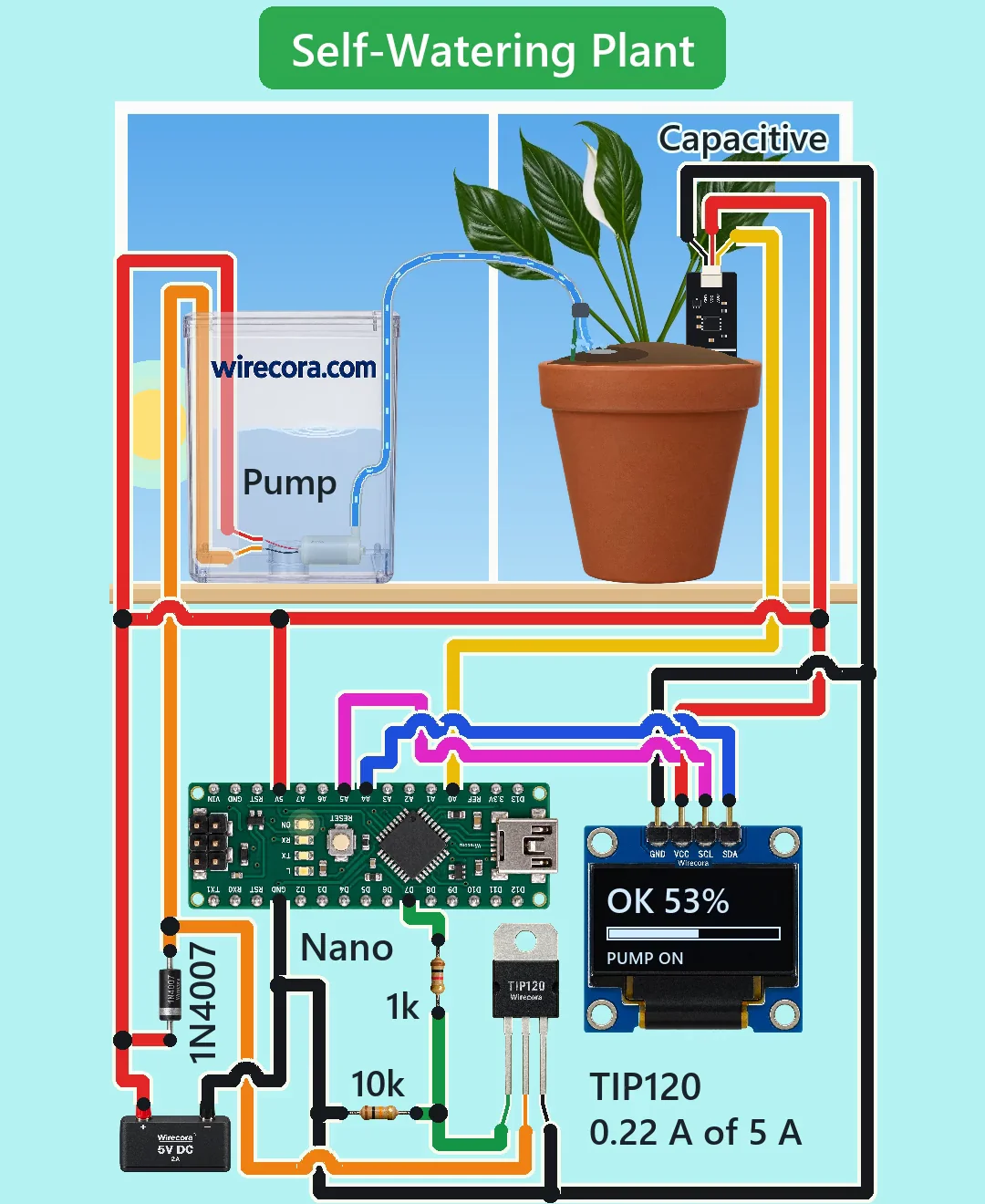
Parts
- Arduino Nano (ATmega328P, 5 V)
- Capacitive soil moisture sensor v1.2 (3.3 to 5.5 V, about 5 mA, output 0 to 3 V that falls as the soil gets wetter; cable red VCC, black GND, yellow AOUT). Capacitive, so it does not rust like the two-prong fork probes
- 0.96 inch I2C OLED, SSD1306, 128 x 64, address 0x3C (pins GND, VCC, SCL, SDA)
- TIP120 Darlington transistor, TO-220 (legs B, C, E from the left with the printed face toward you and the legs down)
- 1 k resistor (bands brown, black, red, gold) and 10 k resistor (brown, black, orange, gold)
- 1N4007 diode across the pump
- 5 V submersible mini pump, 3 to 6 V, about 130 to 220 mA (red wire +, black wire -)
- Clear hose, about 6.5 mm inside and 30 cm long, a water reservoir, a pot and a plant
- 5 V 2 A power supply
- Not drawn in the Short but recommended: a 100 nF ceramic capacitor across the pump and about 470 uF on the 5 V rail, so the motor noise does not shake the reading
How it is wired
- Supply plus (red) to the Nano's 5V pin (not VIN), the sensor's red wire, the OLED's VCC, the pump's red wire and the 1N4007's band (cathode).
- Supply minus (black) to a Nano GND pin, the sensor's black wire, the OLED's GND, the TIP120's emitter (right leg) and one end of the 10 k resistor.
- Sensor yellow wire (AOUT) to A0. The order of the three pins on the sensor board differs between makers, so wire it by the cable colours.
- OLED SDA to A4 and OLED SCL to A5.
- D7 to the 1 k resistor; the resistor's other end to the TIP120 base (left leg) and to the other end of the 10 k resistor.
- TIP120 collector (middle leg) to the pump's black wire and to the 1N4007's plain end (anode).
- The pump sits under water in the reservoir. Push the sensor into the soil only up to its white line, and let the hose drop the water on the far side of the pot from the sensor.
How it works
- The sensor's output voltage falls as the soil gets wetter. The Nano reads it on A0 every 0.1 s and turns it into a percentage: about 520 in dry air (2.5 V) is 0 % and about 260 in water (1.3 V) is 100 %.
- After five readings in a row under 20 %, D7 goes HIGH. About 3.5 mA flows into the TIP120's base through the 1 k resistor, which switches it fully on: the pump gets about 4.2 V and draws about 0.22 A, far under the TIP120's 5 A, and the TIP120 warms by only about 0.18 W.
- At the first reading of 70 % or more, D7 goes LOW and the pump stops. Because it starts under 20 % and stops at 70 %, the pump does not flutter on and off near one value.
- If one run lasts 30 s, the reservoir must be empty: the sketch stops the pump, the screen shows REFILL and the pump stays off until you reset the Nano, so it never runs dry for long.
- The 10 k resistor holds the base low while the Nano starts up and D7 is not yet set, so the pump cannot twitch at power-on. The 1N4007 takes the pump motor's voltage kick when it switches off.
- The whole circuit draws about 0.27 A of the supply's 2 A.
The code: plant_watering.ino
The Arduino code for this circuit is in the Wirecora Discord, in the channel #arduino-code (owner’s choice, 14 October 2026: the code lives where you can ask about it). It is a plain .ino file you can download there.
The sketch from the Short's checked notes, simulated reading by reading against the video; it has not been run on a real board. It needs the Adafruit SSD1306 and Adafruit GFX libraries (Sketch, Include Library, Manage Libraries). Replace 520 and 260 with your own sensor's readings in air and in water.
What the video simplifies
- Time is sped up. A real pot needs about 10 to 20 s of pumping (here about 3 s) and a day or two to dry out (here 2.4 s, shown as one turn of the sun). A real peace lily lifts its leaves over an hour or so.
- The wet soil reaches the sensor 0.2 s after the water lands, and the clay pot darkens faster than real.
- The hose fills in 0.35 s; a real one takes about half a second.
- The water level in the reservoir is drawn constant; a real one drops a little every time.
- The sensor and pump are drawn 1.5 times their size, the boards several times larger than the plant, and the sensor's plug wider than its real 2 mm pin spacing.
- 520 and 260 are typical readings. Every sensor differs: read yours in dry air and in a glass of water and put those numbers in the sketch.
- The 30 s safety stop is in the sketch but is never reached in the video.
- No capacitors are drawn at the pump or on the 5 V rail; add them in a real build (see parts).
- The original viral video used a relay module, a two-prong fork probe that rusts, and a battery pack plus USB. This version uses a TIP120 with a diode, a capacitive sensor, one 5 V supply and a 30 s stop.
- The sound is made, not recorded.
The circuit runs on 5 V, so nothing here can shock you; use a ready-made, closed 5 V adapter and keep it, the Nano and the OLED away from the water and below the sill. Only the sensor's pointed part below its white line goes into the soil: the electronics on its top are not waterproof. Put a tray under the pot in case the pump runs longer than you expect.
Build it yourself
The wiring board cannot run an Arduino program yet, so this one cannot be opened on it. Start with the guided first build on the wiring board, where a circuit really works as you wire it, then try the ready-made ones.
Your first circuit, step by stepAll circuits from the Shorts
Stuck, or built it?
Ask about this circuit or show your build in the Wirecora Discord. Questions get an answer every day.