Hands-free porch doorbell with an Arduino and an HC-SR04
Walk up to the door with your hands full and you do not have to press anything. When you come within 60 cm of the sensor, the porch light comes on and the chime plays ding-dong, once. Stand there as long as you like: it does not ring again. When you leave, the light stays on for a moment, then fades out. After 3 s with nobody near, it is ready for the next visitor.
From the Short Hands Full? This Porch Rings the Doorbell for You (posted 20 October 2026). Opens on YouTube.
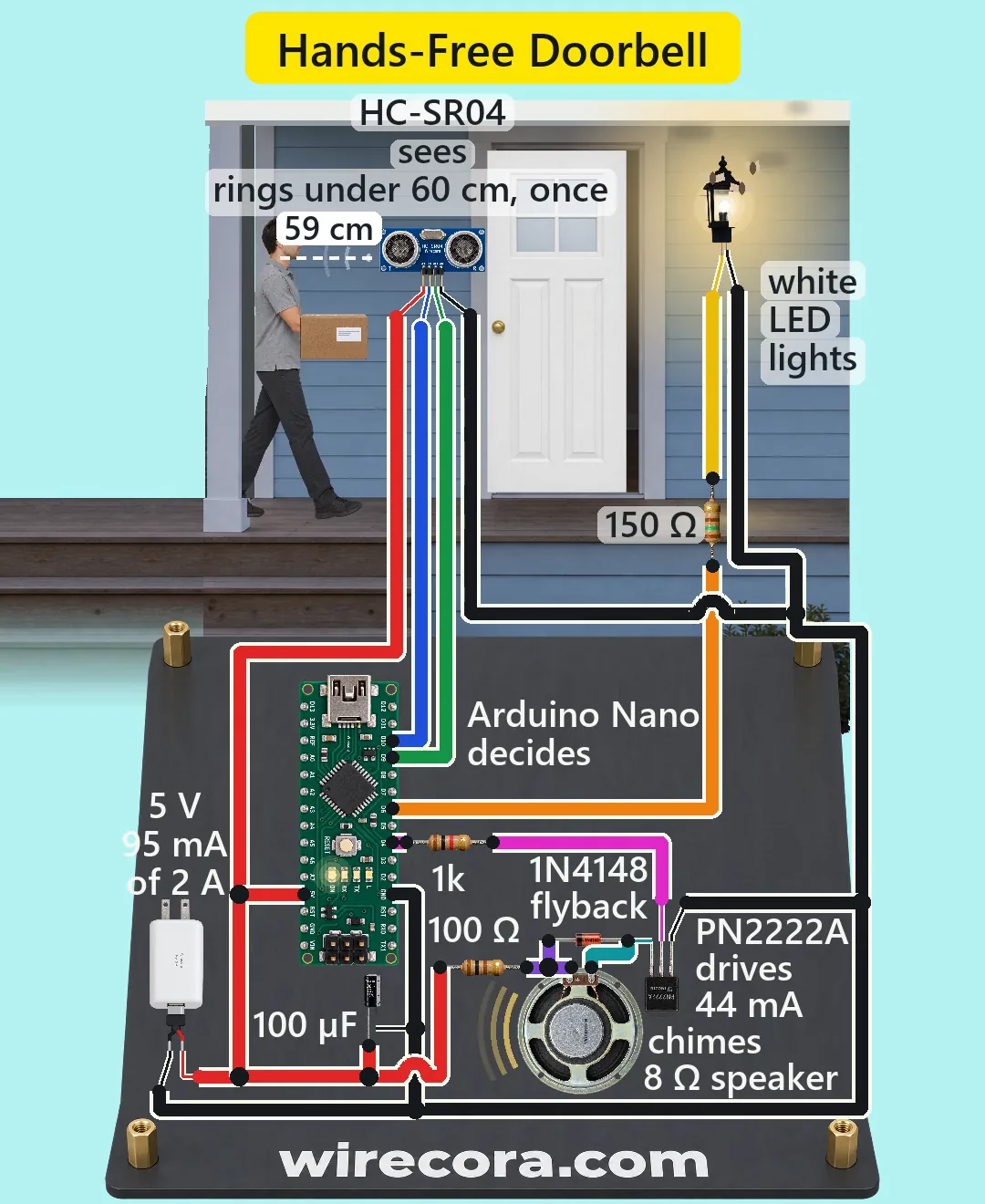
Parts
- Arduino Nano (an Uno works the same: same chip, same pins, same sketch)
- HC-SR04 ultrasonic sensor, 5 V, about 15 mA, pins Vcc, Trig, Echo, Gnd from left to right (2 cm to 4 m, 15 degree beam)
- PN2222A NPN transistor (flat face towards you, legs down: E, B, C from the left; 40 V, 500 mA, 1 A absolute maximum)
- 8 ohm 0.5 W speaker, about 57 mm
- 1N4148 diode (the black band is the cathode)
- White 5 mm LED (about 3.2 V, 30 mA max; the long leg is the anode)
- Resistors, 1/4 W: 1 k for the transistor base (brown, black, red), 100 ohm in series with the speaker (brown, black, brown), 150 ohm for the LED (brown, green, brown)
- 100 uF 25 V electrolytic capacitor (the stripe is the minus side)
- Regulated 5 V 2 A USB adapter with a cut USB cable (red = 5 V, black = ground)
How it is wired
- Adapter plus (5 V, red) to the Nano's 5V pin (not VIN, which needs 7 to 12 V), the HC-SR04 Vcc, one end of the 100 ohm resistor and the capacitor's plus (long) leg.
- Adapter minus (black) to a Nano GND pin, the HC-SR04 Gnd, the PN2222A emitter (E), the LED's cathode (short leg) and the capacitor's minus (stripe) leg. One supply, one common ground.
- Nano D10 to HC-SR04 Trig; HC-SR04 Echo to Nano D9.
- Nano D4 to the 1 k resistor; the other end of the resistor to the PN2222A base (B).
- The free end of the 100 ohm resistor to the speaker's plus tab. The speaker's minus tab to the PN2222A collector (C).
- The 1N4148 across the speaker: band (cathode) on the plus tab, the other end on the minus tab.
- Nano D6 to the 150 ohm resistor; the other end to the LED's anode (long leg). Put the LED in the porch lamp.
- Mount the sensor beside the door, angled out towards the path visitors walk, at about chest height.
How it works
- About every 50 to 80 ms the Nano sends a 10 microsecond pulse to Trig and times the echo on Echo (the datasheet suggests 60 ms or more between pings; at porch distances the echo is back long before the next one). Echo time in microseconds divided by 58 is the distance in cm. It stops listening after 30 ms, so an empty porch reads as nothing.
- A reading between 2 and 60 cm counts as someone near. The Nano first turns the light fully on (analogWrite 255 on D6), then plays the chime: 659 Hz for 350 ms, a 50 ms pause, then 554 Hz for 450 ms. While the chime plays, no new reading is taken.
- The chime rings once per visit. After it rings, the sketch waits until nobody has been near for 3 s before it can ring again.
- After the last near reading the light stays full on for 1.2 s, then fades to off over 1.8 s (PWM on D6).
- The speaker takes (5 - 0.3) / (100 + 8) = about 44 mA while a note plays, more than the 20 mA an Arduino pin should give. So D4 only drives the transistor's base: (5 - 0.75) / 1 k = about 4.3 mA, ten times what the PN2222A needs to pass 44 mA, so it switches fully on.
- The speaker is a coil. When the transistor switches off, the coil tries to keep its current flowing; the 1N4148 gives that current a path, so the collector does not jump to a high voltage.
- The 100 ohm resistor takes about 0.2 W while a note plays (0.1 W on average), under its 1/4 W rating. The LED gets (5 - 3.2) / 150 = 12 mA.
- The 100 uF capacitor across the supply covers the short current pulses of the tone. Worst case the whole circuit takes about 95 mA of the adapter's 2 A.
- tone() uses the timer behind D3 and D11, so PWM on those two pins stops while it plays; D6, the light, uses a different timer and keeps working.
The code: porch_doorbell.ino
The Arduino code for this circuit is in the Wirecora Discord, in the channel #arduino-code (owner’s choice, 14 October 2026: the code lives where you can ask about it). It is a plain .ino file you can download there.
The sketch the Short was animated from, run step by step in a simulation on the distances drawn in the video; it has not been run on a real board yet. No libraries needed. Change NEAR_CM if it rings too early or too late, and HOLD_MS for a longer light.
What the video simplifies
- The ping arcs, the dashed distance line and the arcs from the speaker are drawn to show what happens. Ultrasound is invisible and silent.
- The HC-SR04 is drawn face-on so its pins can be read. In a build it faces out towards the path, at chest height; aimed flat along the wall it would miss a visitor 30 cm or more out from the siding. The reading is then the slant distance.
- The electronics are drawn far larger than the porch, and not to one scale with each other: the speaker is drawn smaller than real next to the Nano.
- A 5 mm LED is drawn lighting the whole lantern. A real porch lamp needs a MOSFET or relay stage; never switch a mains lamp from the Arduino directly.
- The light holds for 1.2 s so it fits the 6 s clip; porch lights usually stay on for about 30 s (change 1200 in the sketch).
- The distance on screen freezes while the chime plays, because the sketch takes no reading then.
- The chime in the video is a soft synthesised tone. The real tone() square wave sounds buzzier, and at about 67 dB at 50 cm it is quieter than a bought doorbell; 47 ohm instead of 100 ohm makes it about 6 dB louder (about 85 mA, still fine for the PN2222A, but use a 1/2 W resistor).
- The moths, the door, the hands and all sounds are drawn or synthesised.
- The HC-SR04 is not weatherproof. Outdoors use a waterproof JSN-SR04T (same Trig and Echo wiring) or keep everything under the porch roof.
- This circuit was checked by simulation and against the datasheets, not built.
Everything runs on 5 V from a regulated USB adapter. Feed the 5V pin only from a regulated 5 V supply, never a battery or anything above 5.5 V, and unplug the adapter before you plug in USB to upload the sketch. Do not wire a mains porch lamp to this circuit: that needs a proper relay or smart-switch module and, in many countries, an electrician. Keep the electronics in a box out of the rain.
Build it yourself
The wiring board cannot run an Arduino program yet, so this one cannot be opened on it. Start with the guided first build on the wiring board, where a circuit really works as you wire it, then try the ready-made ones.
Your first circuit, step by stepAll circuits from the Shorts
Stuck, or built it?
Ask about this circuit or show your build in the Wirecora Discord. Questions get an answer every day.