Robot eyes that react to your hand, with an Arduino, an OLED and an HC-SR04
A pair of robot eyes on a small screen watches your hand. Far away, the eyes look happy. Closer than 40 cm they turn worried, and closer than 15 cm they turn angry and shake. Take the hand away and they calm down again, back to happy. The distance in cm shows under the eyes.
From the Short Arduino Robot Eyes React to Your Hand (590K views, posted 13 October 2026). Opens on YouTube.
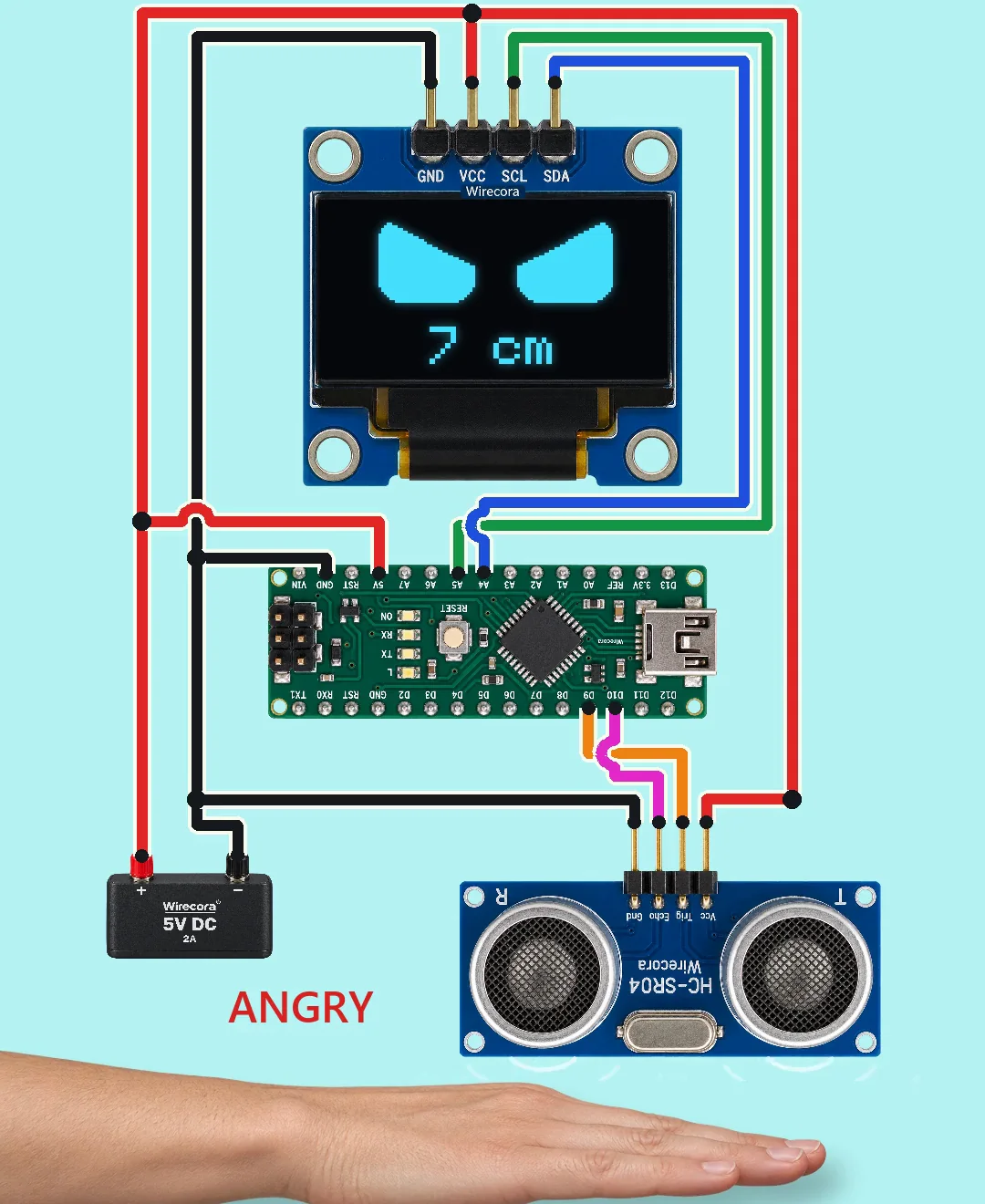
Parts
- Arduino Nano (an Uno works the same)
- 0.96 inch OLED, SSD1306 chip, 128 x 64 pixels, I2C, four pins (GND, VCC, SCL, SDA on the one in the Short), 3.3 to 5 V, up to 20 mA, address 0x3C
- HC-SR04 ultrasonic sensor, 5 V, about 15 mA, pins Vcc, Trig, Echo, Gnd (2 cm to 4 m)
- Regulated 5 V supply (the Short uses a 5 V 2 A one; the whole circuit takes about 54 mA)
- Jumper wires. No resistors or capacitors: most of these OLED boards have their own pull-up resistors and their own 3.3 V regulator
How it is wired
- Supply plus (5 V) to the Nano's 5V pin (not VIN, which needs 7 to 12 V), the OLED's VCC and the HC-SR04 Vcc.
- Supply minus to a Nano GND pin, the OLED's GND and the HC-SR04 Gnd. One common ground.
- OLED SDA to Nano A4; OLED SCL to Nano A5. On a Nano these two pins are the I2C bus; do not swap them.
- HC-SR04 Trig to Nano D9; HC-SR04 Echo to Nano D10.
- Wire the OLED by the names printed on your board, not by position: the one in the Short has GND first, but many boards have VCC first, and swapping them feeds the screen backwards.
- Point the sensor's two round cans at where the hand comes.
- For a desk build the Nano's USB cable alone can power everything (54 mA): leave the 5 V supply out and take 5 V for the OLED and the sensor from the Nano's 5V pin.
How it works
- About 16 times a second the Nano sends a 10 microsecond pulse to Trig. The HC-SR04 sends eight cycles of 40 kHz sound and holds Echo high until the echo comes back. Echo time in microseconds divided by 58 is the distance in cm. The Nano stops listening after 30 ms, about 5 m.
- Over 40 cm the eyes are happy, from 15 to 40 cm worried, under 15 cm angry. In the Short the hand goes from 56 cm to 7 cm and back.
- The eyes do not jump from one mood to the next: every frame each eyelid shape moves halfway to its new target, so a change eases in over about a quarter of a second. While angry, the eyes shake one pixel left and right every frame.
- Each eye is a lit block with rounded corners. The sketch cuts dark shapes out of it: a circle from below for happy, a triangle at the outer top corner for worried, a triangle at the inner top corner for angry.
- The Nano draws the whole 128 x 64 picture in its own memory (1 KB of its 2 KB) and then sends it to the screen over I2C, address 0x3C.
- The HC-SR04 runs on 5 V and its Echo gives 5 V, which the Nano reads directly. The OLED takes 5 V on VCC because its board has a 3.3 V regulator.
- Currents: Nano about 19 mA, OLED up to 20 mA, sensor 15 mA: about 54 mA in all, a small part of a 2 A supply.
The code: robot_eyes.ino
The Arduino code for this circuit is in the Wirecora Discord, in the channel #arduino-code (owner’s choice, 14 October 2026: the code lives where you can ask about it). It is a plain .ino file you can download there.
The sketch the Short was animated from, with two lines changed (marked) so that when nothing echoes the eyes stay happy and the screen says "far" instead of angry eyes at 0 cm. The video's version was run step by step in a simulation on the distances drawn in the video; the two changed lines were not, and the sketch has not been run on a real board yet. It needs the Adafruit SSD1306 and Adafruit GFX libraries (Sketch, Include Library, Manage Libraries). If the screen stays black, change 0x3C to 0x3D. A 1.3 inch OLED usually has an SH1106 chip and needs another library.
What the video simplifies
- The words HAPPY, WORRIED and ANGRY are labels in the video. The real screen shows only the eyes and the distance.
- The gap between the hand and the sensor is not to scale (about 4 pixels per cm), and the hand moves from 56 cm to 7 cm and back in 5 seconds.
- The rings under the sensor are drawn to show the sound pulse. 40 kHz is invisible, and you cannot hear it.
- The Nano and the HC-SR04 are drawn turned upside down so the wires stay short, so their printing reads upside down. Also, the sensor's cans really point out of its face: in a build the hand comes in front of the cans, not past the board's edge.
- The screen in the video is drawn from the sketch at 128 x 64 and scaled up. A few digits may differ by a pixel from a real screen's font.
- About 16 frames a second is assumed. The real speed depends on the library and the I2C speed.
- In the video's sketch, no echo at all (nothing in front of the sensor within about 5 m) read as 0 cm and gave angry eyes. The sketch on this page counts no echo as far away: the eyes stay happy and the screen says "far".
- The sounds are synthesised.
- This circuit was checked by simulation and against the datasheets, not built.
Everything runs on 5 V. Feed the 5V pin only from a regulated 5 V supply, never a battery or anything above 5.5 V, and unplug the supply before you plug in USB to upload the sketch.
Build it yourself
The wiring board cannot run an Arduino program yet, so this one cannot be opened on it. Start with the guided first build on the wiring board, where a circuit really works as you wire it, then try the ready-made ones.
Your first circuit, step by stepAll circuits from the Shorts
Stuck, or built it?
Ask about this circuit or show your build in the Wirecora Discord. Questions get an answer every day.