Doorbell spider drop with an Arduino Nano, an L298N and a TT gear motor
Press the doorbell and a big rubber spider drops 10 cm onto the finger that rang it, bobs on its elastic line, then climbs back up in three tugs and parks at exactly the same spot, ready for the next trick-or-treater. It drops once per press and only for whoever rings, not for every passer-by.
From the Short Ring This Doorbell and a Spider Drops on Your Hand (posted 25 October 2026). Opens on YouTube.
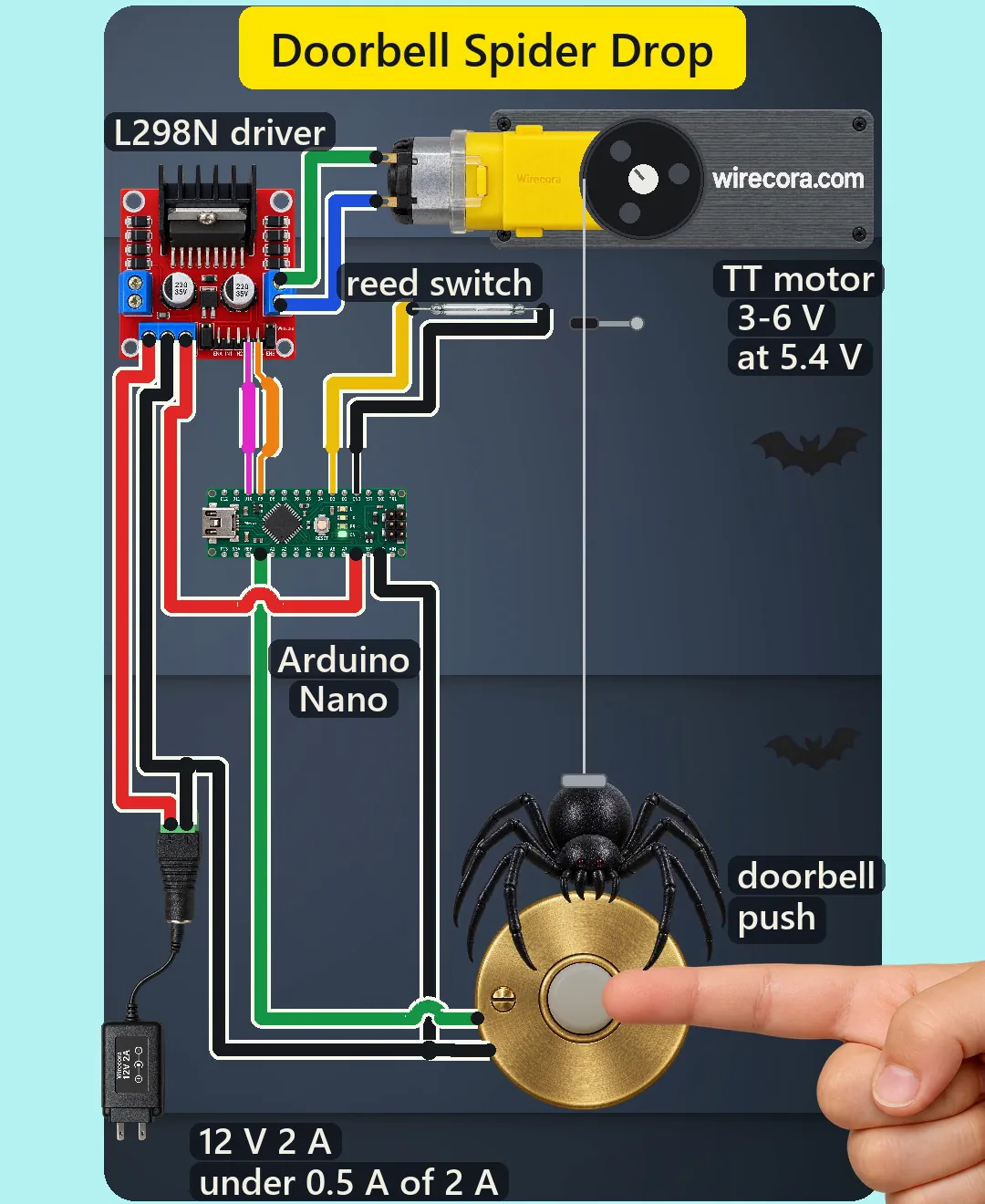
Parts
- Arduino Nano (an Uno works the same: same chip, same pins, same sketch)
- L298N motor driver module (5 to 35 V motor supply, 2 A per channel; its 5 V regulator jumper fitted and its ENB jumper cap left on, as shipped; eight flyback diodes and two 220 uF 35 V capacitors are already on the board)
- TT gear motor, 3 to 6 V, 1:48 gearbox (about 150 mA with no load, 200 rpm at 6 V), with a small spool on its shaft (25 mm core)
- Reed switch, normally open, two leads, not polarised (0.5 A switching)
- Small disc magnet, about 10 x 3 mm, glued on the spider's back
- Momentary doorbell push, normally open (your own push, wired only to the Arduino)
- About 20 cm of 1 mm round jewellery elastic and a small rubber grommet on the line as the home stop
- A light rubber Halloween spider, 6 to 7 cm across (about 12 g)
- DC barrel jack (5.5 x 2.1 mm, centre pin +) and a regulated 12 V 2 A adapter, centre positive
- A mounting bracket for the motor and the reed switch above the doorbell, and a box for the electronics
How it is wired
- Adapter into the barrel jack. Jack + (centre pin) to the L298N 12V screw terminal, jack minus to the L298N GND screw terminal.
- L298N 5V screw terminal to the Nano 5V pin. With the regulator jumper fitted and 12 V or less in, the module's own 78M05 makes 5 V and this terminal is an output. The Nano's VIN stays free. Never put 12 V on the Nano's 5V pin. In the Short both of these power wires are red: follow the terminals, not the colour.
- One common ground: the L298N GND also goes to a Nano GND pin. The Nano's two GND pins are joined on the board, so either one works.
- Nano D10 to IN3 and Nano D9 to IN4. Leave the ENB jumper cap on (ENB then sits at 5 V, always enabled). D9 and D10 are PWM pins, so the speed is set on the IN pins, not on ENB.
- L298N OUT4 to one motor terminal and OUT3 to the other. A TT motor has no plus or minus side: if the spider rises when you press the bell, swap the two motor wires.
- Doorbell push between Nano A0 and GND. Its two wires go through the wall to the two screws on the back of the push. A0 works as a normal digital input here.
- Reed switch between Nano D3 and GND. The sketch turns on the Nano's internal pull-ups on A0 and D3, so neither switch needs a resistor.
- Mount the reed switch flat under the bracket, right beside the elastic line, and glue the magnet on top of the spider's body. Thread the line through the rubber grommet just above the magnet's home height, so the magnet comes to rest against it with the reed closed.
- Tie the elastic to the spool so it leaves the spool's edge and hangs straight down over the doorbell. Set the length so the spider's lowest point is at hand height above the push, never at face height.
How it works
- At rest the spider hangs at home: the magnet holds the reed closed, so D3 reads LOW. The push is open and the internal pull-up holds A0 HIGH. Both IN pins are LOW with the bridge enabled, so the two low-side transistors short the motor (a brake) and the 1:48 gearbox holds the spider in place.
- A press pulls A0 to GND. After a 20 ms debounce, and only if the spider is home, the sketch runs the motor outwards for 0.4 s: IN4 LOW and PWM 135 of 255 on IN3. Then it brakes. The spool lets out about 24 cm of line a second, so the spider drops about 10 cm, counting the little run-on into the elastic, and stops at the fingertip.
- The spider runs on a little into the elastic and bobs about 4 times a second until the bounce dies away. That bob is just a 12 g spider on a soft elastic line.
- After 1.1 s of hanging the sketch winds it back in tugs: 0.3 s of PWM 77 on IN4 (about 3 V at the motor), a brake, a 0.35 s pause, and again. It checks the reed every millisecond, so the pull stops the moment the magnet closes it. In the Short that takes three tugs.
- The reed homes it every time, so the spider never drifts lower or higher over many drops, as a climb timed by the clock would. If the magnet is lost and the reed never closes, the sketch gives up after 8 tugs (about 2.4 s of motor time at 3 V).
- One drop per press: the sketch waits until the button is let go before it can drop again, and it ignores the bell while the spider is not home.
- Why PWM on the IN pins and not on ENB: with the other IN pin LOW and ENB high, every PWM off-time shorts the motor through the two low-side transistors, so the motor sees the average of the PWM voltage. PWM on ENB switches all four transistors off in the off-time and the motor would run faster than planned.
- Voltage at the motor: the L298N's two output transistors lose about 1.8 V together (1.4 V at the least at this small current), so from 12 V about 10.2 V reaches the motor. 135/255 of that is about 5.4 V on average, 5.9 V at most with a 12.6 V adapter and the smallest drop, inside the motor's 6 V. The climb gets about 3 V.
- Why 12 V and not a 5 V USB supply: the L298 needs its motor supply at least 2.5 V above the high level on its logic inputs, so about 7.5 V or more with 5 V logic.
- Currents: the motor about 0.15 A while it turns, the L298N's own logic and bridge up to about 0.1 A, the Nano about 20 mA: about 0.2 A typical and under 0.5 A at worst, of the adapter's 2 A. A stalled TT motor takes up to about 1.5 A (Adafruit measured 1.5 A at 6 V and 1.1 A at 3 V), still under the L298N's 2 A and, with the rest, under the adapter's 2 A. The 78M05 drops (12 - 5) V x about 55 mA = 0.38 W. Each switch carries only the pull-up current, 0.25 mA at most.
- Protection: the eight flyback diodes on the L298N catch the motor's voltage kicks, and the two 220 uF capacitors on the board sit across the 12 V input. No extra diode or capacitor is needed.
- Why an Arduino: the motor has to turn both ways and stop at home, which a plain switch and battery cannot do. Why a doorbell and not a motion sensor: store drop spiders fire on any movement and drop on the mail carrier too.
The code: spider_drop_doorbell.ino
The Arduino code for this circuit is in the Wirecora Discord, in the channel #arduino-code (owner’s choice, 14 October 2026: the code lives where you can ask about it). It is a plain .ino file you can download there.
The sketch the Short was animated from: the same timing and states ran in the video's simulation. It needs no libraries. It has not been compiled or run on a real board. Tune DROP_MS for the drop length and LIFT_PWM for the climb to your own motor and elastic.
What the video simplifies
- The Nano, the L298N and the adapter are drawn on the wall beside the doorbell so the wiring can be seen. A real build hides them in a box.
- The adapter is drawn much smaller than it is, and the reed switch about 1.5 times larger. The rest of the scene is at one scale.
- The adapter's blades hang in the air; no wall socket is drawn.
- The magnet, the elastic line, the barrel jack, the ENB jumper, the flyback diodes and most pin names are not labelled in the video for lack of room. They are all on this page.
- The motor speed is taken as proportional to the average PWM voltage. A real motor on slow-decay PWM can run a little faster, so the drop may come out 4 to 17 % longer and the climb may take two tugs instead of three. Tune DROP_MS (and LIFT_PWM) to your motor.
- Assumed: the spider's 12 g, the elastic's stiffness (8 N per metre), the spool's 26 mm working diameter and the reed's 10 mm pull-in distance. The bounce follows from them. With another elastic the spider may rest 1 to 2 mm under the stop instead of on it; the reed still stays closed.
- The L298N picture shows no lit power LED although the board is powered, and an unused jumper cap on ENA (channel A is not used).
- While the Nano boots (1 to 2 s at plug-in) its pins float and the motor may twitch once; the sketch then brakes and winds the spider home.
- Nothing rings: there is no chime or speaker, the push only clicks.
- The child's hand is an animated picture, and all the sounds are synthesised.
- This circuit was checked by simulation and against the datasheets, not built.
Everything runs on 12 V and 5 V DC from a regulated, certified 12 V adapter. Use your own momentary push: never connect the house's doorbell wiring (often 16 V AC from a transformer, and mains on its other side) to the Arduino. Never put 12 V on the Nano's 5V pin. Use a light rubber spider with no hard or sharp parts, and set the line so it stops at hand height, never in front of faces or eyes. Keep fingers away from the spool while it turns and unplug before you work on it. Put the electronics in a box out of the rain, and tape the cables down so nobody trips on the porch.
Build it yourself
The wiring board cannot run an Arduino program yet and has no motor driver or reed switch, so this one cannot be opened on it. Start with the guided first build on the wiring board, where a circuit really works as you wire it, then try the ready-made ones.
Your first circuit, step by stepAll circuits from the Shorts
Stuck, or built it?
Ask about this circuit or show your build in the Wirecora Discord. Questions get an answer every day.