Spirit board that answers by itself, with an Arduino Nano, an MG995 servo and a magnet under the board
Everyone rests a fingertip on the planchette and nothing happens. Press ASK: the candle shivers, everyone lets go, and the planchette glides by itself to YES. A moment later it slides on past NO to GOODBYE, then goes home to the question mark. The trick: under the board a servo swings a 15 cm arm with a strong magnet at its tip, and a steel washer glued under the planchette follows the magnet through the wood.
From the Short Press ASK and the Spirit Board Answers YES (posted 28 October 2026). Opens on YouTube.
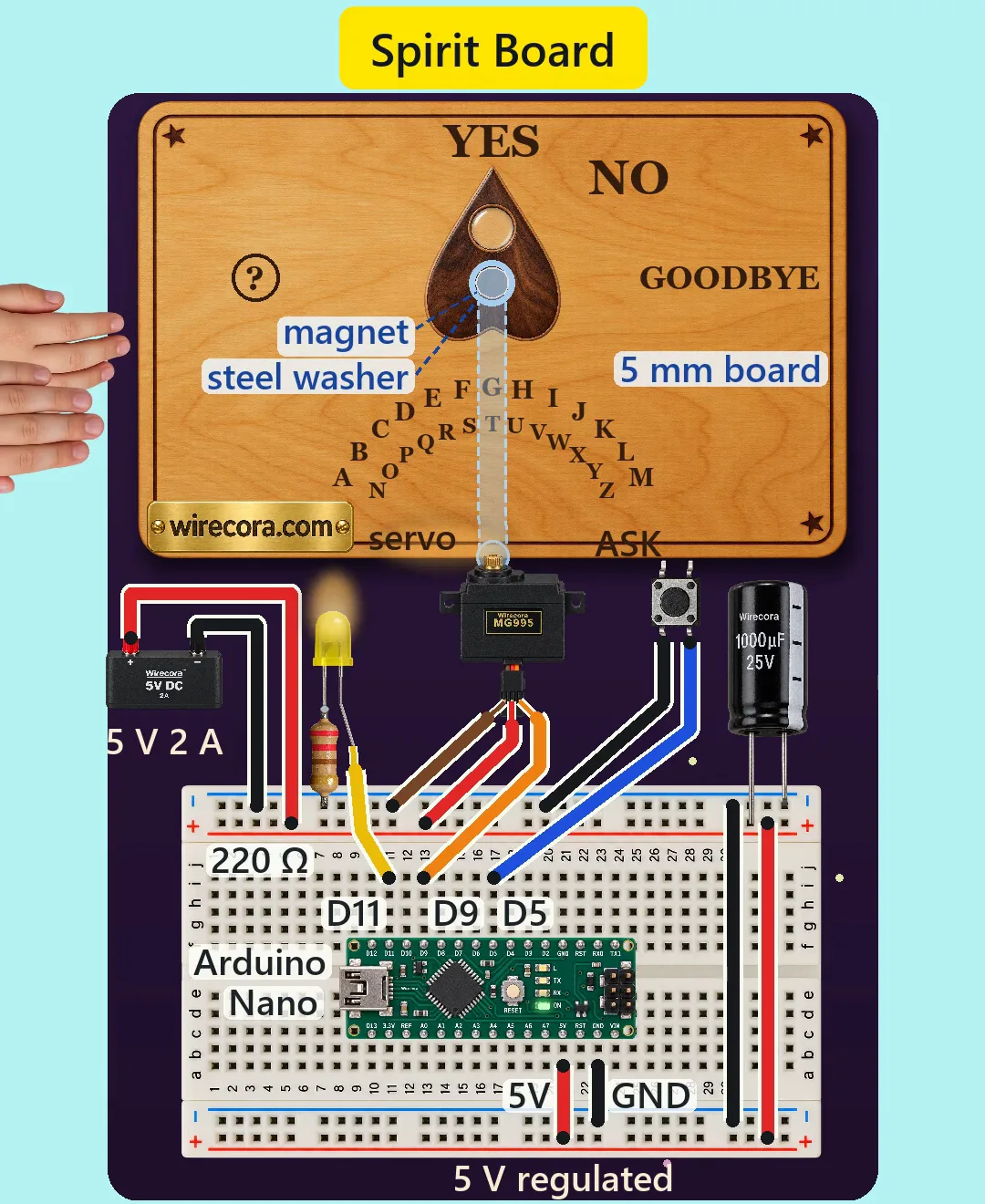
Parts
- Arduino Nano, 5 V, 16 MHz (an Uno works the same with the same pin numbers)
- MG995 servo (4.8 to 7.2 V, about 8.5 kgf·cm at 4.8 V, 0.2 s per 60 degrees; wires brown = GND, red = +5 V, orange = signal) with a round or single-arm horn
- 5 V 2 A regulated power supply (a plug-in 5 V adapter with bare leads or screw terminals is fine)
- 1000 uF, 25 V electrolytic capacitor (the stripe marks minus)
- 6 mm tactile push button (the ASK button)
- Yellow 5 mm LED (the candle) and a 220 ohm resistor, 1/4 W (bands red, red, brown, gold)
- Half breadboard (400 points) and jumper wires
- 20 x 5 mm neodymium disc magnet (N42 or similar)
- 25 mm steel washer (it must stick to a magnet: plain steel, not stainless or brass)
- A strip of aluminium angle, 15 x 15 x 1.5 mm, about 17 cm long, for the arm (a flat bar bends under the magnet's pull and rubs)
- A board about 35 x 22 cm, 5 mm thick (plywood, MDF or hardboard), as the lid of a shallow box about 6 cm deep
- A planchette (wood or 3D printed, about 6 x 8 cm) and three felt pads or PTFE glide dots for its feet
- Glue, small screws, and a way to hold the servo in the box (a bracket or a wooden block)
How it is wired
- Supply + (red) to the top red rail of the breadboard, supply - (black) to the top blue rail.
- Join the rails at the right end: a red jumper from the top red rail to the bottom red rail, a black jumper from the top blue rail to the bottom blue rail. The two rail pairs of a breadboard are not joined by themselves.
- 1000 uF capacitor straight across the top rails: long leg (+) in the red rail, the striped leg (-) in the blue rail.
- Nano across the middle groove. Its 5V pin to the bottom red rail and its GND pin (on the same header as 5V) to the bottom blue rail. A regulated 5 V into the 5V pin is allowed; never a battery there, and leave VIN free.
- Servo red to the + rail, brown to the - rail, orange to Nano D9. The servo takes its current from the rails, straight from the supply, not through the Nano.
- ASK button: one leg to Nano D5, the other to the - rail. A tactile button has two pairs of legs that are always joined; use two legs that are not, diagonally opposite legs always work. No resistor: the sketch turns on the Nano's own pull-up, so D5 reads LOW while the button is pressed.
- Candle LED: long leg (anode) to Nano D11; short leg (cathode) through the 220 ohm resistor to the - rail. The resistor works on either leg; the current is the same.
- Mechanics: fix the servo in the box under the middle of the board's front edge, shaft up, about 1 cm under the board. Screw the aluminium arm to the horn and glue the magnet on its end, 15 cm from the shaft, so it rides about 1 mm under the board without touching it.
- Glue the steel washer under the middle of the planchette and put the felt pads on its three feet.
- Print or draw the answers on a circle of 15 cm around the point above the shaft: the question mark ring at 150 degrees (left), YES at 90 degrees (straight ahead, at the top), NO at 60 and GOODBYE at 30 degrees (right). Best: run the sketch once, see where the arm really stops, and put the words there. If your servo turns the other way, use 180 minus each angle in the sketch.
How it works
- While nobody asks, the Nano checks the ASK button every 40 ms and keeps the candle flickering: a random brightness between 140 and 255 on D11.
- Press ASK and D5 reads LOW. For 0.36 s the candle gutters: random brightness from 30 to 255, so it dips and jumps. That is the moment everyone lets go.
- Then the arm turns from 150 to 90 degrees in 0.6 s, in steps every 10 ms with a soft start and stop (a 1 - cos curve). The magnet drags the washer, so the planchette slides 15 cm along the arc and stops on YES.
- It waits 1.32 s, turns on to GOODBYE (90 to 30 degrees in 0.7 s, passing NO on the way), waits 0.28 s and glides home to the question mark in 1.02 s. About 4.3 s after the press it is ready for the next question. Holding ASK down does not repeat it: the sketch waits until you let go.
- Servo pulses: the Servo library turns 0 to 180 degrees into 544 to 2400 microseconds, so 150 degrees is about 2090 us, 90 about 1472 us, 60 about 1162 us and 30 about 853 us, all inside the MG995's 500 to 2500 us.
- Force: a 40 g planchette and a 10 g washer pressed down by about 0.5 kgf of magnet pull, on felt with a friction of about 0.25, need about 0.14 kgf to slide. At the end of a 15 cm arm that is about 2.1 kgf·cm of the servo's 8.5. Even if the magnet rubs the underside it is about 4.3 kgf·cm, still half the rating.
- Grip: through about 7 mm (the 5 mm board, the 1 mm air gap and the planchette's felt) the magnet should hold the washer sideways with roughly 0.25 kgf, about 1.7 times what the slide needs. Grab the planchette and the magnet just slips away under it, so nothing strains.
- Speed: the fastest move asks for about 185 degrees a second at its peak. With this light load an MG995 still makes about 225, so the planchette keeps up.
- Why D11 and D9: the Servo library uses Timer1, which stops PWM on D9 and D10 only. The servo itself sits on D9 (the library makes its own pulses on any pin) and the candle uses D11, which runs on Timer2 and can still dim.
- Why the 1000 uF: when the servo starts it pulls a burst of current. The capacitor and the 2 A supply hold the 5 V rail steady, so the Nano does not brown out and reset.
- Current: about 0.54 A while the arm moves (the servo about 0.5 A, assumed). Worst case, with the arm blocked and the servo stalled at about 1.5 A, the whole build takes about 1.6 A of the supply's 2 A.
- Candle: (5 - 2.0 V) / 220 ohm = about 14 mA at full brightness, under the pin's 20 mA and the LED's 30 mA.
- The sketch sets the servo's first position before attach(), so at power-up the arm goes straight home instead of jumping to 90 degrees first.
The code: spirit_board.ino
The Arduino code for this circuit is in the Wirecora Discord, in the channel #arduino-code (owner’s choice, 14 October 2026: the code lives where you can ask about it). It is a plain .ino file you can download there.
The sketch the Short was animated from, run step by step in a simulation of the press, the arm and the candle in the video; it has not been run on a real board yet. One change for the page: Servo.h in angle brackets (the Short's text could not hold them). It needs only the Servo library, which comes with the Arduino IDE. The angles in the first lines are where the arm stops for each word: change them to fit your board, or use 180 minus each one if your servo turns the other way.
What the video simplifies
- The arm, the magnet and the washer under the wood are drawn as a blue x-ray so you can see the trick. In a build they are hidden in the box under the board.
- The servo is drawn on its side in front of the board's edge. In a build it stands shaft-up in the box under the board, and the box reaches about 3 cm in front of the board so the servo body fits.
- The electronics are drawn larger than the board, the supply smaller, and the Nano's pin rows one breadboard hole closer together than a real Nano's.
- The LED's long leg is drawn bent by hand so it stays clear of the resistor.
- The candle glow on the board is drawn much brighter than one LED could really make, and the flicker repeats the same pattern every loop (the sketch's is random).
- The words are printed where our drawn arm stops; on a real build, mark them where your arm stops.
- The planchette is drawn exactly over the magnet, never turning or lagging. A real one trails by a few mm and may turn a little; a magnet that rubs the board would trail the fast glide home by up to 0.1 s. PTFE glide dots instead of felt halve the friction if yours lags.
- The timings are nominal. A real Nano spends a little time on each step, so a real run is about 0.05 s slower per question.
- Assumed, not measured: the magnet's pull through the board (0.5 kgf; the maker only publishes 6.4 kg at contact, so check yours with a luggage scale), its sideways hold (0.25 kgf), the felt friction, the servo's current while moving, and that the servo's bearings take the magnet's side pull on the shaft. The 1.5 A stall current comes from a seller's sheet.
- The button's pull-up current (0.1 to 0.25 mA) is below the 1 mA minimum load in the button's datasheet. Every Arduino button example works this way, but it is outside that figure.
- The hands, the timing of the kids letting go and all the sounds are staged. The haunted boards in the viral clips are acted; here a servo, a magnet and a washer do the work.
- This circuit was checked by simulation and against the datasheets, not built.
Low voltage only: one 5 V 2 A supply. The candle is an LED, so no real flame near the board, paper or fabric. Neodymium magnets snap together hard and can pinch skin or shatter; keep them away from small children (two swallowed magnets can be very dangerous), pacemakers, bank cards and phones. Keep fingers out of the box while the arm can move. It is a party trick: tell your guests how it works afterwards.
Build it yourself
The wiring board cannot run an Arduino program yet, so this one cannot be opened on it. Start with the guided first build on the wiring board, where a circuit really works as you wire it, then try the ready-made ones.
Your first circuit, step by stepAll circuits from the Shorts
Stuck, or built it?
Ask about this circuit or show your build in the Wirecora Discord. Questions get an answer every day.