Stair lights that follow you, with an Arduino and two HC-SR04 sensors
Walk up to the bottom step and the stair lights up one step after another, ahead of you, all the way to the top. Leave at the top and the steps fade out behind you in the same order, a little slower. Coming down from the top works the same way in reverse.
From the Short Stairs That Light Up Step by Step as You Walk Up (posted 23 October 2026). Opens on YouTube.
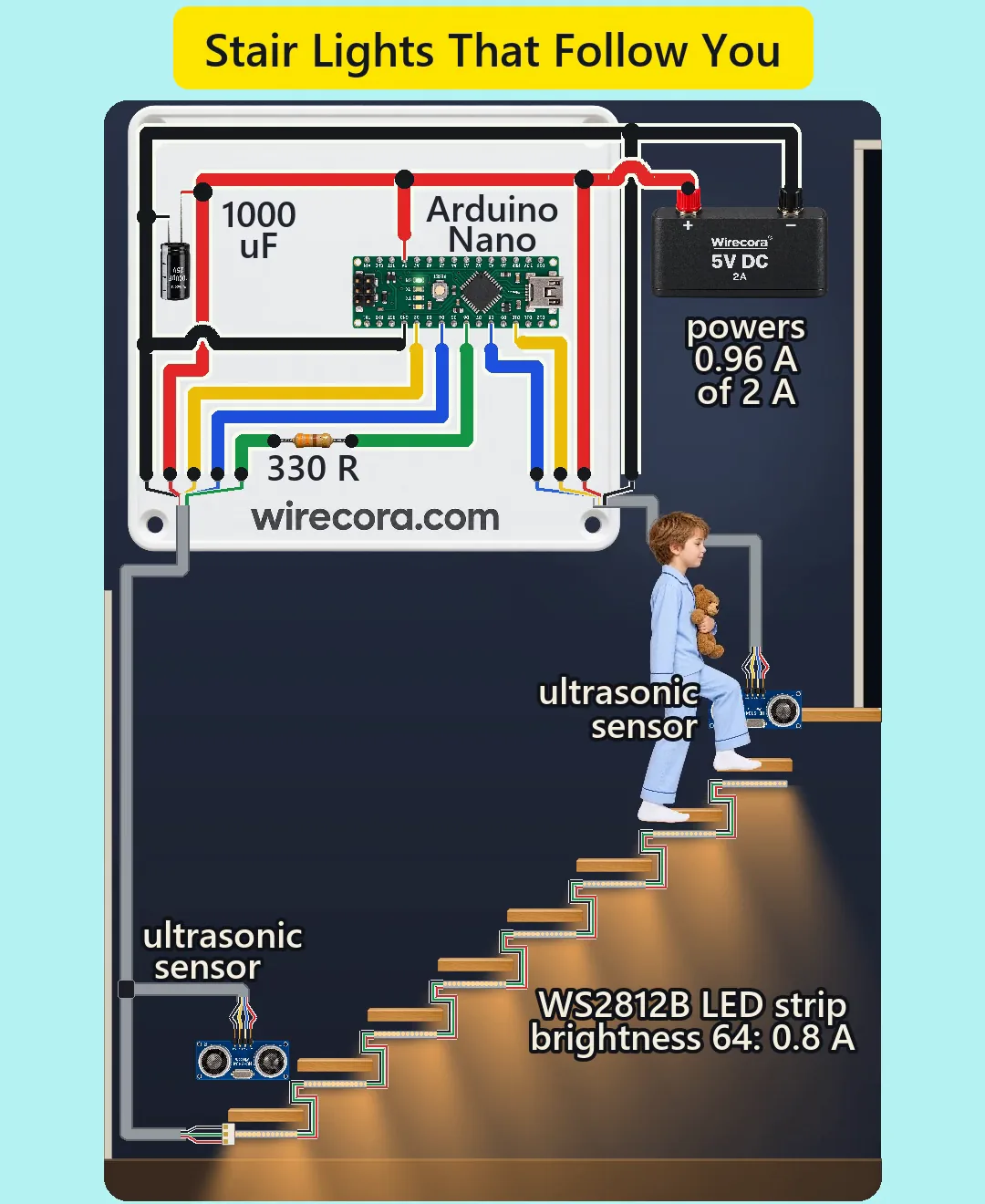
Parts
- Arduino Nano (an Uno works the same)
- 2 x HC-SR04 ultrasonic sensor, 5 V, about 15 mA each, pins VCC, TRIG, ECHO, GND; it sees 2 cm to 4 m in a 15 degree cone
- WS2812B LED strip, 60 LEDs per metre, cut at the cut lines into 8 pieces of 14 LEDs (234 mm, one under each tread): 112 LEDs in one chain. About 50 to 60 mA per LED at full white.
- 330 ohm resistor, 1/4 W, in the data line
- 1000 uF 25 V electrolytic capacitor (the stripe is the minus side)
- Regulated 5 V 2 A power adapter with screw terminals
- A 3-pin strip connector, three-core cable (0.5 mm2 for the power cores) for the 2 m run to the bottom step, short three-wire jumps between the pieces, and a four-core cable to each sensor
How it is wired
- Adapter plus (5 V) to the Nano's 5V pin, the capacitor's plus leg, the strip's +5V pad and both sensors' VCC. Leave the Nano's VIN pin empty.
- Adapter minus to a Nano GND pin, the capacitor's minus (stripe) leg, the strip's GND pad and both sensors' GND. One common ground.
- Nano D6 to the 330 ohm resistor; the resistor to the strip's DI pad at the input end of the bottom piece (the end the little arrows point away from).
- Chain the pieces: each piece's output end (GND, DO, +5V) to the next piece's input end (GND, DI, +5V) with three short wires, bottom step to top step. Data only runs from DI to DO.
- Bottom sensor: TRIG to Nano D4, ECHO to Nano D2. Top sensor: TRIG to Nano D8, ECHO to Nano D10.
- Mount one sensor on the wall just above the first step and one just above the last step, both looking straight out across the stair.
- Put the 330 ohm resistor and the 1000 uF capacitor at the strip's input end, not at the Nano, when the cable to the first step is long (the video has them at the controller, see below).
How it works
- While nobody is on the stair, the Nano pings the bottom sensor, then the top one, each followed by a 30 ms pause, so each sensor is pinged about every 72 ms and the two never ping at once.
- Echo time in microseconds divided by 58 is the distance in cm. It stops listening after 6 ms, about 1 m. A reading from 2 to 69 cm means someone is on that step; the stair is 80 cm wide, so the far side reads more.
- Whichever end fires first sets the direction. The Nano fades the steps in one after another toward the other end: 9 levels per step, one step every 0.18 s, the whole wave about 1.5 s.
- Then it waits for the sensor at the other end to see the walker (30 s at most) and then to see them leave. 0.3 s later it fades the steps out from the end they came in, one every 0.23 s.
- It starts over only when both ends are clear, so the walker leaving at the top does not set off a new wave.
- The colour is warm white (255, 140, 40) at brightness 64 of 255: about 7 mA per LED, 0.8 A for all 112, about 0.96 A for the whole build out of the adapter's 2 A (taking 50 mA per LED at full white; a strip that takes 60 mA gives about 1.1 A). Full white would be 5.6 to 6.7 A; the sketch never asks for it.
- The Nano's HIGH is 5 V and the strip needs at least 3.5 V on DI, so no level shifter is needed. The last LED still gets about 4.7 V over the 2 m cable.
The code: stair_lights.ino
The Arduino code for this circuit is in the Wirecora Discord, in the channel #arduino-code (owner’s choice, 14 October 2026: the code lives where you can ask about it). It is a plain .ino file you can download there.
The sketch the Short was animated from, run step by step in a simulation on the distances drawn in the video; it has not been run on a real board yet. It uses the Adafruit NeoPixel library (Sketch, Include Library, Manage Libraries). For a different stair change STEPS, PER_STEP and NEAR_CM (a little less than the stair's width).
What the video simplifies
- The Nano, the plate, the supply and the sensors are drawn several times larger than the stair so the pins and labels can be read.
- The 330 ohm resistor and the 1000 uF capacitor sit on the controller plate at the start of a 2 m cable. It works, but at the strip's input end they do their job better; build it that way, or add a second 1000 uF at the strip.
- The pale rings around a sensor only show while it hears an echo; ultrasound is invisible and silent.
- The child is assumed to walk about 35 cm from the wall, and a reading counts when the leg covers about a third of the sensor's face.
- Only the walk up is shown; coming down from the top runs the same wave the other way.
- While a wave runs the sketch reads no sensor, so someone arriving at the other end during the 1.8 s fade-out is noticed only after it ends.
- In the two wait loops one sensor is pinged every 36 ms, under the 60 ms the HC-SR04 sheet asks for. At these distances the echo is long gone, but some clone modules miss every other ping; use delay(60) in seen() if yours does.
- The open side of the stair has no glass guard in the picture; a real floating stair has one.
- The strip's current when dark, the split of 50 mA over the three colours and the copper resistance are assumed values. A real stair trips up to 72 ms earlier or later than the clip.
- The sounds are synthesised. This circuit was checked by simulation and against the datasheets, not built.
Everything runs on 5 V from a regulated, certified adapter, never a battery or 12 V on the Nano's 5V pin. To upload a new sketch over USB, first unplug the adapter and the strip's 3-pin connector, so the USB port never has to feed the LEDs. Keep the brightness cap in the sketch: 112 LEDs at full white would pull 5.6 to 6.7 A, about three times what a 2 A adapter gives, and would heat the thin strip wiring. Use 0.5 mm2 cores for the power run, put a 2 A fuse in the 5 V lead, and keep the strip pieces and cables tucked under the treads and clipped to the wall so nobody can catch a foot on them. Lights on a stair help, but do not rely on them alone: keep a normal light switch for the stairs.
Build it yourself
The wiring board cannot run an Arduino program yet, so this one cannot be opened on it. Start with the guided first build on the wiring board, where a circuit really works as you wire it, then try the ready-made ones.
Your first circuit, step by stepAll circuits from the Shorts
Stuck, or built it?
Ask about this circuit or show your build in the Wirecora Discord. Questions get an answer every day.