Toy car speed trap with an Arduino Nano, two IR sensors and an LCD
A die-cast toy car rolls down an orange track and passes over two sensors that sit 10 cm (4 in) apart. The Arduino times the gap in microseconds, works out the real speed in m/s, and shows it on the LCD with the scale speed in mph (real speed x 64 for a 1:64 car). The faster car in the Short does 3.40 m/s, shown as 487 scale mph and a RECORD. The slower one does 2.90 m/s, shown as 415 mph, and sets no record.
From the Short How Fast Is a Toy Car Really? This Speed Trap Shows Scale MPH (posted 29 October 2026). Opens on YouTube.
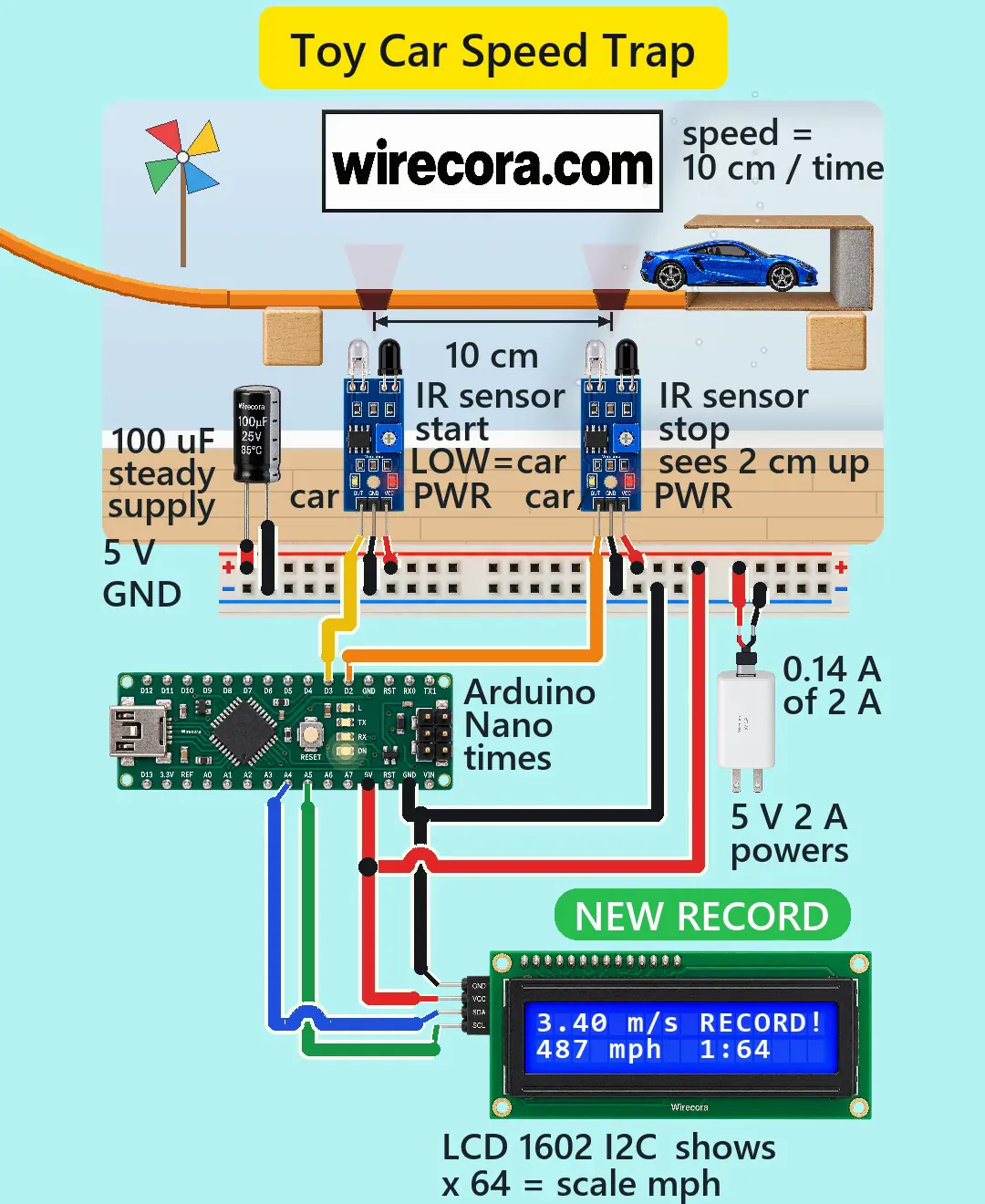
Parts
- Arduino Nano (an Uno works the same: same chip, same pins, same sketch). Its USB socket is Mini-B.
- Two FC-51 IR obstacle sensor modules, 3.3 to 5 V, pins OUT, GND, VCC from left to right seen from the component side with the two LEDs pointing up (follow the print on your board). OUT goes LOW while something is within range (2 to 30 cm, set with the trimmer), view angle about 35 degrees
- LCD 1602 I2C module (the 16 x 2 screen with the 4-pin backpack: GND, VCC, SDA, SCL; 5 V; address 0x27 or 0x3F)
- 100 uF 25 V electrolytic capacitor (the stripe is the minus side)
- 5 V 2 A USB adapter with its cable cut open and stripped (red lead = USB pin 1, +5 V; black lead = ground; tape off any other wires in the cable), or any regulated 5 V supply of 1 A or more
- A breadboard power rail (the + and - strips of a breadboard are enough) and jumper wires
- A toy track about 80 cm (31 in) high at its start, two 1:64 die-cast cars (about 75 mm, 3 in long), a catch box with a foam pad at the end, and two small windows of smoked infrared-pass plastic or plain open slots in the track
How it is wired
- Adapter red lead to the + strip of the rail. Adapter black lead to the - strip.
- 100 uF capacitor across the rail: the long leg (plus) in the + strip, the striped leg (minus) in the - strip.
- Each FC-51: VCC to the + strip and GND to the - strip.
- FC-51 number 1 (the start sensor): OUT to Nano D3.
- FC-51 number 2 (the stop sensor): OUT to Nano D2.
- Nano 5V pin to the + strip. Nano GND pin to the - strip. Leave VIN empty: it wants 7 to 12 V and this build has none. Do not plug a USB cable into the Nano while the adapter feeds the 5V pin, unless you know your board: a genuine Nano has a Schottky diode between its USB 5 V and its 5V pin that keeps the adapter's 5 V out of the computer, but some clone boards use a plain diode or none.
- LCD VCC to the + strip and LCD GND to the - strip. LCD SDA to Nano A4 and LCD SCL to Nano A5. In the picture the SDA and SCL wires cross once, and the red feed hops over the black ground wire once; where a wire hops over another, they do not touch.
- Fix the two sensors under the track with their LEDs pointing up and their centres exactly 10 cm (4 in) apart. Each looks up through a small window or slot in the track, at the underside of a passing car.
- Set both trimmers the same way: turn each until its obstacle LED lights when a car's underside is over it and stays dark with no car. The distance is only about 2 cm (0.8 in) to the car's chassis, near the module's 2 cm lower limit, so go slowly. Do not just pick 4 cm.
- Upload the sketch below. If the screen stays blank, run an I2C scanner and change 0x27 to 0x3F if that is what it finds.
How it works
- Each FC-51 shines infrared up from one LED and watches for the bounce with the other. A car's chassis over it pulls OUT LOW. With no car, OUT stays HIGH.
- The sensors sit under the track, in its shadow, so room light matters less. Strong sunlight can still trip an infrared sensor, so keep it out of the slots.
- Sensor 1 on D3 and sensor 2 on D2 are both external-interrupt pins of the ATmega328P. A falling edge on D3 stores micros() as t1. The next falling edge on D2 stores it as t2. The two have to come in that order, so a stray pulse on D2 alone does nothing.
- speed = 0.100 m / (t2 - t1). The blue car took 29,412 us: 3.40 m/s, which is 7.606 mph, times 64 = 487 scale mph. The red car took 34,484 us: 2.90 m/s, 6.49 mph, times 64 = 415 scale mph.
- micros() counts in 4 us steps on a 16 MHz board. Against 29,400 us that is 0.014 %, or about 0.07 mph at 487. The real limit is the two trimmers: if the two trip points differ by 2 mm out of 100 mm, that is 2 %, about 10 mph at 487.
- The sketch keeps the best result since power-on and prints RECORD! only when a run beats it with >. A tie does not count.
- If sensor 1 fires and sensor 2 does not within 1 second, the sketch forgets sensor 1 and starts again.
- The scale speed is a fun comparison, not physics. Real cars do not scale like that, because air drag grows with size. The real 3.40 m/s is on the screen too.
- Power, estimated: Nano about 25 mA, two FC-51 about 43 mA each (some draw nearer 20 mA), LCD with backlight about 30 mA. Total about 0.14 A of a 2 A adapter. These are estimates, not measured. Nothing here is a coil, so no flyback diode, relay or buzzer is needed.
- Logic levels: the FC-51 output is about 5 V high and under 0.4 V low. The ATmega328P at 5 V reads above 3.0 V as high and below 1.5 V as low, so both are clear. The LCD backpack's pull-ups go to 5 V, which the ATmega accepts.
- Why the track starts high: a car at 3.40 m/s needs at least v squared over 2g = 0.59 m of drop, so the track starts about 80 cm (31 in) up.
- A car at 3.40 m/s with an assumed 35 g body carries about 0.20 J. A foam pad that gives about 2 cm (assumed) stops it, so fix or weigh the box so it does not slide.
The code: toy_car_speed_trap.ino
The Arduino code for this circuit is in the Wirecora Discord, in the channel #arduino-code (owner’s choice, 14 October 2026: the code lives where you can ask about it). It is a plain .ino file you can download there.
The sketch the Short was animated from, run step by step in a simulation of the passes drawn in the video; it has not been run on a real board yet. It needs the LiquidCrystal_I2C library (some forks use lcd.begin() instead of lcd.init()). GAP_M is the distance between the two sensors in metres, 0.100 here.
What the video simplifies
- Each pass is shown 10 times slower, with a SLOW-MO x10 tag on screen. A car crosses the 10 cm gap in 29 ms, under two video frames, so you could not see it otherwise. The timing and the LCD run in real time; only the picture is slowed.
- The speeds 3.40 and 2.90 m/s and the 35 g car are assumed, not measured. The track starts about 80 cm up, off the screen.
- The IR windows are an assumption. A plain open slot works too. A flat window can bounce the emitter's light back into the receiver, so if the sensor trips by itself, tilt the window a few degrees.
- Infrared is invisible. The faint red glow on the windows and the sensing cones are drawn to show where each sensor looks.
- The electronics are drawn 2 to 3 times larger than the toy scene so the pins and labels can be read. An FC-51 is really about 32 x 14 mm (1.3 x 0.55 in); in the picture it is drawn as long as the 75 mm car.
- A real LCD takes about 1 second to count up with the I2C writes and blurs fast digits. The Short draws the count in 0.4 seconds.
- Each stopped car is taken out of the box between runs (it fades in the video). The loop replays the same two runs; on a real track a second 487 would only tie the record and not print RECORD!.
- The box jolt, the dust puff, the NEW RECORD pill and the display flash are decoration. The best 487 tag shows the sketch's best variable.
- The sounds are synthesised.
- This circuit was checked by simulation and against the datasheets, not built.
Everything runs on 5 V from a regulated, certified USB adapter. Cut and strip only the cable end, with the adapter unplugged, and cover bare ends. Keep the track and its start ramp stable: a car at 3.4 m/s is a small projectile. Fix the catch box so it cannot slide, and keep fingers and eyes out of the track.
Build it yourself
The wiring board has an IR obstacle sensor and an Arduino Uno, but no Arduino Nano, no LCD 1602 I2C and no way to run an Arduino program yet, so this one cannot be opened on it. Start with the guided first build on the wiring board, where a circuit really works as you wire it, then try the ready-made ones.
Your first circuit, step by stepAll circuits from the Shorts
Stuck, or built it?
Ask about this circuit or show your build in the Wirecora Discord. Questions get an answer every day.