TV that switches itself off when a child sits too close, with an Arduino Nano, an HC-SR04 sensor and a relay module
A child scoots up close to the cartoon: the relay clicks and the TV screen goes black. The child moves back and the show comes on again by itself. An ultrasonic sensor under the TV measures the distance about 16 times a second; the TV goes off under 40 cm and comes back on over 55 cm.
From the Short Sit Too Close and the TV Turns Itself Off (posted 27 October 2026). Opens on YouTube.
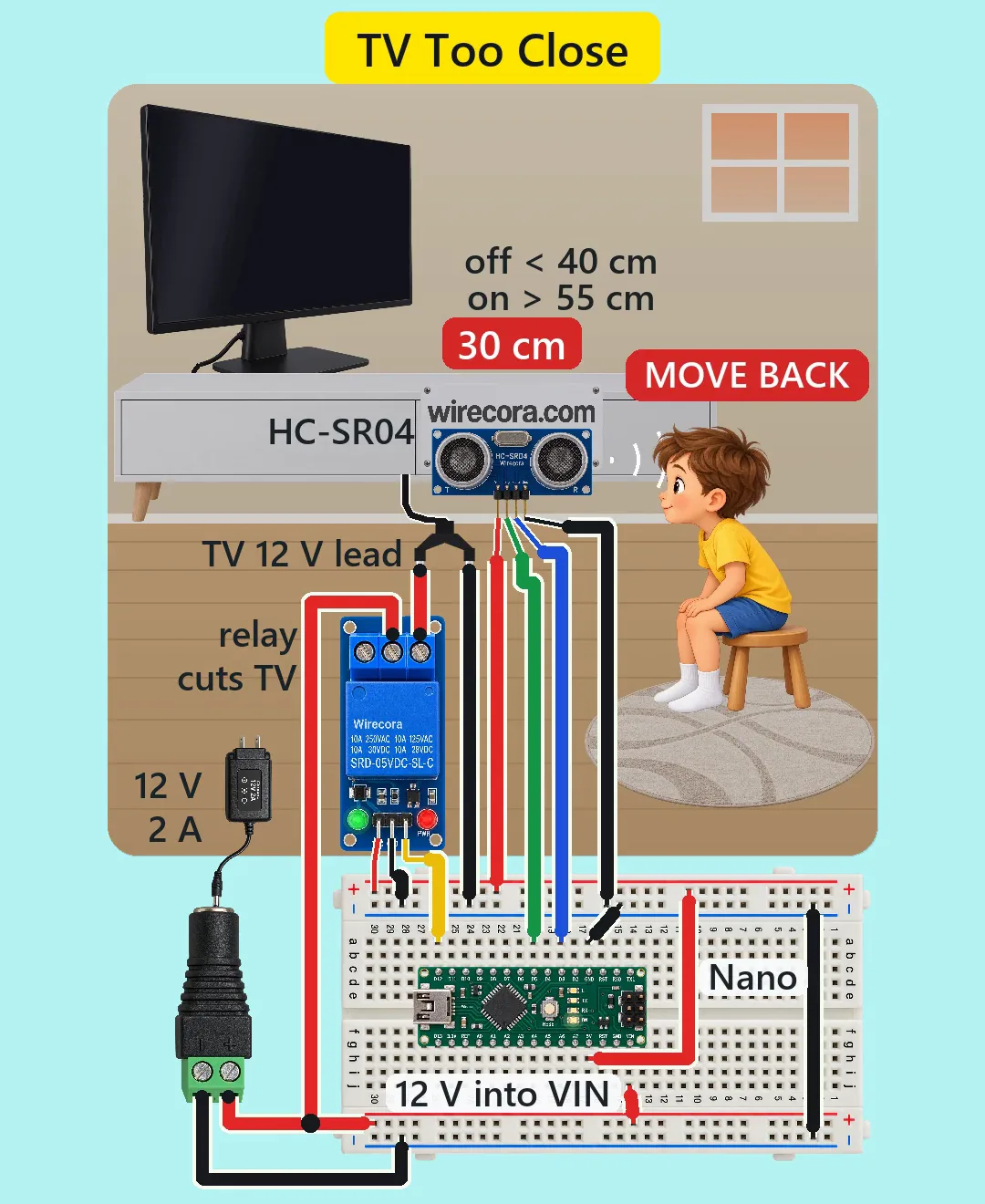
Parts
- Arduino Nano, 5 V, 16 MHz (an Uno works the same with the same pin numbers)
- HC-SR04 ultrasonic distance sensor (5 V, about 15 mA; pins VCC, TRIG, ECHO, GND; 2 cm to 4 m, about a 15 degree beam)
- 1-channel 5 V relay module, active LOW (it switches on when IN is LOW; header VCC, GND, IN; screw terminals NO, COM, NC; SRD-05VDC-SL-C relay, coil about 71 mA, contacts 10 A at 30 V DC; its transistor and flyback diode are on the module)
- 12 V DC TV rated 16 W (1.33 A) or less, for example a 15.6-inch 12 V kitchen or RV TV (a Sylvox 15.6-inch set lists 16 W maximum). Read the rating on your own TV's label: a 19-inch RV set at about 2 A is too much for this adapter
- 12 V 2 A power adapter, barrel plug, centre positive
- DC barrel jack with screw terminals (+ and -)
- A barrel-plug pigtail (or the TV's cut DC cable) so the TV's plus and minus leads can go to screw terminals
- Half breadboard (400 points) and jumper wires
- Optional: a 470 uF, 25 V electrolytic capacitor across VIN and GND, and a small 5 V buck module (see How it works)
How it is wired
- Adapter into the barrel jack. Jack + to the lower red rail of the breadboard (12 V). Jack - to the lower blue rail (ground).
- Relay COM to the 12 V: in the Short its wire is joined onto the jack's + wire. In a build, solder and sleeve that joint, or give COM its own hole in the 12 V rail.
- Relay NC to the TV's + lead. TV's - lead to the upper blue rail. NO stays free. With the relay at rest, COM and NC are joined, so the TV plays.
- Join the upper blue rail to the lower blue rail with a short black jumper at the far end of the board. Now every ground is one ground.
- Nano across the middle groove. Nano VIN to the 12 V rail (VIN is made for 7 to 12 V). Nano 5V pin to the upper red rail: here 5V is the output of the Nano's own regulator. Never join VIN and 5V.
- Nano GND (the one on the D2 to D12 side) to the upper blue rail.
- HC-SR04: VCC to the 5 V rail, TRIG to D5, ECHO to D3, GND to the ground rail. ECHO is a 5 V signal and the Nano is a 5 V board, so no divider is needed (a 3.3 V board would need one).
- Relay module: VCC to the 5 V rail, GND to the ground rail, IN to D12. Leave D0, D1 and D13 free: D13 blinks at start-up and would click the relay.
- Mount the sensor under the TV pointing at the child's chest when they sit on the stool, so the beam goes over the stool and the floor.
How it works
- The Nano sends a 10 microsecond pulse to TRIG. The sensor sends a burst of ultrasound and holds ECHO high until the echo comes back. Echo time divided by 58 gives centimetres: 30 cm is about 1740 microseconds, 40 cm about 2320, 55 cm about 3190.
- One reading takes the echo time plus delay(59), about 62 ms, so about 16 readings a second. The HC-SR04 datasheet asks for at least 60 ms between readings.
- Two readings in a row under 40 cm: the Nano writes LOW to D12, the relay pulls in (about 10 ms), NC opens and the TV loses its 12 V. One stray echo does nothing. From crossing 40 cm to the click takes at most about 0.14 s.
- Two readings in a row over 55 cm: D12 goes HIGH, the relay lets go, NC closes and the TV gets its 12 V back. The 15 cm gap between 40 and 55 cm keeps it from flickering when someone sits right at the line.
- Why NC and not NO: the coil (71 mA) is on only while the TV is off, which is usually a few seconds. The rest of the time the relay rests and the TV just plays. If the Nano is unplugged or crashes with D12 HIGH, the TV stays on.
- Why the sketch writes HIGH before setting the pin as an output: the module is active LOW, so a pin that starts LOW would click the relay and blink the TV at power-up.
- Current: the TV takes at most 1.33 A and the electronics about 0.045 A, so about 1.4 A of the 2 A adapter. That same current runs through the breadboard's ground rails, under the 2 A a breadboard contact is rated for. The relay contacts carry 1.33 A at 12 V against their 10 A at 30 V DC.
- Heat: all 5 V parts run from the Nano's regulator, fed with 12 V. Normally that is about 43 mA (0.3 W of heat). While the TV is off the coil, the relay LED and the IN current add up to about 137 mA (about 0.96 W). If the TV stays off for minutes, TI's datasheet puts the regulator at about 76 to 100 C, under its 125 C limit. If the screen may stay off for long, or your Nano is a clone with an AMS1117 regulator, feed the relay module's VCC from a small 5 V buck module.
- If the Nano resets when the TV switches on, add a 470 uF, 25 V capacitor across VIN and GND, or give the TV its own adapter.
- At 30 to 60 cm the beam is about 8 to 16 cm wide, so it sees the child's chest, not the stool's legs below it.
The code: tv_too_close.ino
The Arduino code for this circuit is in the Wirecora Discord, in the channel #arduino-code (owner’s choice, 14 October 2026: the code lives where you can ask about it). It is a plain .ino file you can download there.
The sketch the Short was animated from, run step by step in a simulation on the child's distance in the video; it has not been run on a real board yet. No libraries. To watch the distance while you aim the sensor, add Serial.begin(9600) in setup() and Serial.println(cm) in loop().
What the video simplifies
- The room, the child and the TV are drawn in a simple perspective: the TV is drawn larger than the child's scale and the child stays the same size near and far.
- The electronics are drawn much larger than the room, and the adapter smaller than the breadboard's scale (the barrel jack looks bigger than the adapter).
- The sensor is drawn facing you so its pins and the wirecora.com print can be read. In a build it points along the TV's line at the child.
- The TV's 12 V cable comes out from under the cabinet and is drawn split into two leads. In a build cut it or use a barrel-plug pigtail.
- The relay's COM wire is drawn joined onto the jack's + wire. Solder and sleeve that joint, or use its own hole in the 12 V rail.
- The black wires into the blue (ground) rails pass over the red rail hole in the same column; they plug into the blue rail only. Never put a ground wire into a red rail hole: the ground jumper at the board's end in a red rail would short the 12 V adapter.
- The distance readout, the MOVE BACK sign and the sound rings are drawn for you. A real build has no screen, and ultrasound is invisible and silent.
- The original viral Short beeps a buzzer. This one has none: the relay's click and the screen going dark are the alarm, with fewer parts and wires.
- The TV's current, its 0.7 s start-up (real sets often take 1 to 3 s) and the cartoon carrying on where it stopped are assumed. Many 12 V TVs switch back on by themselves when power returns; some need the remote.
- A pet walking through the beam at 30 cm would switch the TV off too.
- The cartoon is our own, and all the sounds are added.
- This circuit was checked by simulation and against the datasheets, not built.
Low voltage only: one 12 V adapter and a 12 V DC TV. Never switch a mains TV with this relay. For a big TV on mains, use the same sensor and sketch to send the remote's IR pause or an HDMI-CEC standby instead. For a 12 V TV, cutting its power is the same as pulling its plug. Eye doctors (American Academy of Ophthalmology) say sitting close does not damage a child's eyes, though it can tire them, and a child who always sits close may be short-sighted and worth an eye test: this is a habit reminder, not an eye protector and not a babysitter. Keep the TV at 16 W (1.33 A) or less, so the total stays near 1.4 A of the adapter's 2 A, and for a build you keep, solder it instead of using a breadboard.
Build it yourself
The wiring board cannot run an Arduino program yet, so this one cannot be opened on it. Start with the guided first build on the wiring board, where a circuit really works as you wire it, then try the ready-made ones.
Your first circuit, step by stepAll circuits from the Shorts
Stuck, or built it?
Ask about this circuit or show your build in the Wirecora Discord. Questions get an answer every day.