N-channel MOSFET · TO-92
2N7000 Pinout
Flat face toward you, legs pointing down, left to right: 1 source, 2 gate, 3 drain (S-G-D).
A small N-channel MOSFET in a TO-92 case: a 5 V pin switches LEDs and small relays up to 200 mA, with no base current.
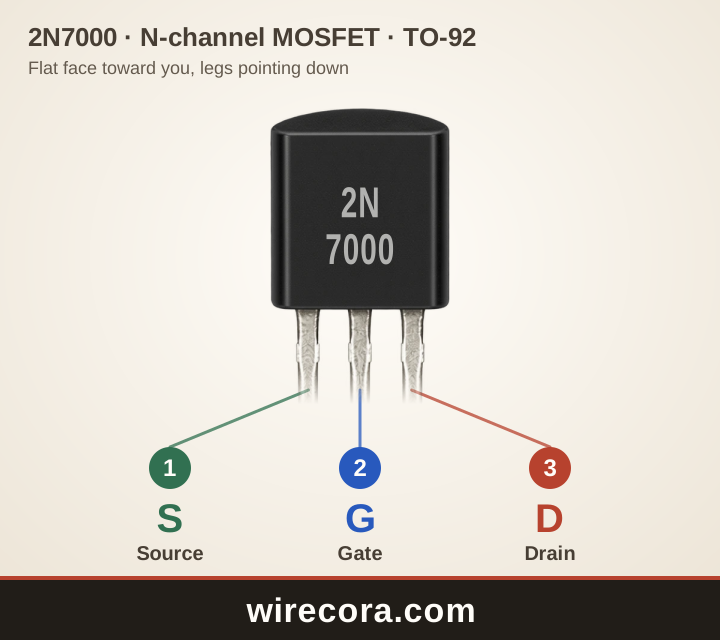
- Pin 1: Source (S)Goes to 0 V (ground) when the MOSFET switches the low side of a load.
- Pin 2: Gate (G)The control pin. The voltage between gate and source turns it on; almost no current flows in.
- Pin 3: Drain (D)Goes to the load (LED, small relay coil). Current flows in here and out of the source.
Check your part before wiring. Read the maker and the full part number printed on it, open that maker's datasheet, or test the legs with a multimeter's diode setting.
PNG 1440 × 1280 pixels, SVG to any size. Both keep the wirecora.com mark along the bottom.
Pinout table
Which leg of the 2N7000 is which?
| Pin | Name | What it does |
|---|---|---|
| 1 | Source S | Goes to 0 V (ground) when the MOSFET switches the low side of a load. |
| 2 | Gate G | The control pin. The voltage between gate and source turns it on; almost no current flows in. |
| 3 | Drain D | Goes to the load (LED, small relay coil). Current flows in here and out of the source. |
Key ratings
How much can the 2N7000 take?
From the onsemi datasheet: 2N7000G Small Signal MOSFET 200 mAmps, 60 Volts, N-Channel TO-92 (2N7000/D, Rev. 8). Stay well inside these limits: they are the most the part takes, not what it should run at.
Open the onsemi datasheet (PDF)Pin order by maker
Is every 2N7000 wired S-G-D?
The onsemi and Siliconix datasheets both number the legs 1 source, 2 gate, 3 drain: S-G-D with the flat face toward you. The two makers differ only on power: 350 mW at onsemi, 400 mW at Siliconix.
Do not mix it up with the 2N7002. That is a surface-mount part (SOT-23) with a different pin order (gate, source, drain at Diodes Inc), so its layout does not apply to the 2N7000.
A first circuit
Switch an LED from a 5 V Arduino pin
- Supply: 5 V. LED and a 220 Ω resistor in a row from +5 V to the drain (the LED's long leg toward +5 V).
- Source straight to 0 V, shared with the Arduino's 0 V.
- A 100 Ω resistor from the Arduino pin to the gate, and a 100 kΩ resistor from the gate to the source.
- Pin high: the MOSFET turns on and about 13 mA lights the LED. Pin low: the LED goes out.
Use a 5 V pin: the gate threshold can be as high as 3.0 V, so a 3.3 V pin may not turn it on properly. The 100 kΩ keeps the MOSFET off while the pin is not driving it.
2N7000 questions
What is the 2N7000 pinout?
With the flat face toward you and the legs pointing down, from left to right: source, gate, drain (S-G-D). That is pin 1, 2 and 3 in the onsemi and Siliconix datasheets.
Can an Arduino drive a 2N7000?
From a 5 V pin, yes, for small loads: onsemi promises at least 75 mA and at most 6 Ω at 4.5 V on the gate. That is fine for LEDs and small relays (with a diode across the coil), not for motors.
How much current can a 2N7000 switch?
200 mA continuous and 500 mA in short pulses, up to 60 V. It can shed only 350 mW of heat, so keep the current low.
Is the 2N7000 the same as the 2N7002?
Electrically they are close, but the 2N7002 is a surface-mount SOT-23 part with a different pin order. The 2N7000 is the TO-92 one with S-G-D legs.
Why does the 2N7000 need a resistor from gate to source?
The gate holds charge like a tiny capacitor. With nothing driving it, it can float half on. About 100 kΩ from gate to source drains it and keeps the MOSFET off.
Can I use this pinout picture?
Yes. Download it as PNG or SVG and use it in notes, lessons or posts. The wirecora.com mark along the bottom stays in the picture.
Pin order and ratings from the onsemi datasheet named above. Last reviewed .