N-channel MOSFET · TO-220
IRFZ44N Pinout
Printed face toward you, metal tab at the back, legs pointing down, left to right: 1 gate, 2 drain, 3 source (G-D-S). The metal tab is joined to the drain.
A 55 V N-channel power MOSFET with very low on-resistance, for motors, LED strips and heaters.
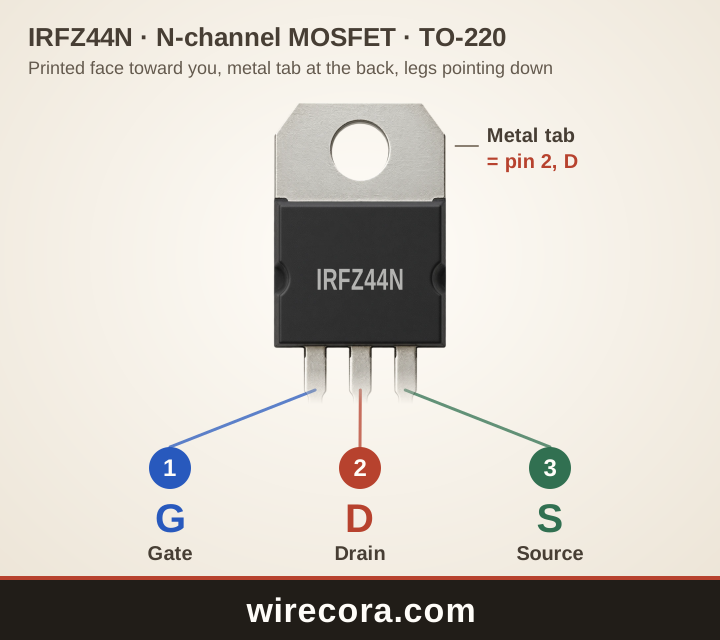
- Pin 1: Gate (G)The control pin. The voltage between gate and source turns it on; almost no current flows in.
- Pin 2: Drain (D)Goes to the load. Also joined to the metal tab.
- Pin 3: Source (S)Goes to 0 V (ground) when the MOSFET switches the low side of a load.
Metal tab: joined to pin 2, the drain, inside the part.
Check your part before wiring. Read the maker and the full part number printed on it, open that maker's datasheet, or test the legs with a multimeter's diode setting.
PNG 1440 × 1280 pixels, SVG to any size. Both keep the wirecora.com mark along the bottom.
Pinout table
Which leg of the IRFZ44N is which?
| Pin | Name | What it does |
|---|---|---|
| 1 | Gate G | The control pin. The voltage between gate and source turns it on; almost no current flows in. |
| 2 | Drain D | Goes to the load. Also joined to the metal tab. |
| 3 | Source S | Goes to 0 V (ground) when the MOSFET switches the low side of a load. |
| Tab | Metal tab D | Joined to pin 2, the drain, so it carries the same voltage. Keep it away from other metal unless you mean it to touch. |
Key ratings
How much can the IRFZ44N take?
From the Infineon (International Rectifier) datasheet: IRFZ44NPbF HEXFET Power MOSFET (Rev. 2.1). Stay well inside these limits: they are the most the part takes, not what it should run at.
Open the Infineon (International Rectifier) datasheet (PDF)Pin order by maker
Is every IRFZ44N wired G-D-S?
The Infineon datasheet names the legs gate, drain, source (G-D-S) with the printed face toward you, the usual order for TO-220 MOSFETs. The tab is the drain.
Not every TO-220 MOSFET follows G-D-S, so check the datasheet of the one you have. The IRFZ44N is not a logic-level part: its resistance is only promised at 10 V on the gate. For 5 V or 3.3 V pins, a logic-level type such as the IRLZ44N fits better.
A first circuit
Switch a 12 V LED strip with a switch
- LED strip from +12 V to the drain. Source to 0 V.
- A 10 kΩ resistor from the gate to the source keeps the MOSFET off when nothing drives the gate.
- A 100 Ω resistor from the gate to a switch, and the switch's other side to +12 V.
- Switch on: the gate gets 12 V and the strip lights at full brightness. Switch off: the 10 kΩ pulls the gate down and it goes dark.
From a 5 V Arduino pin the IRFZ44N only half turns on at higher currents and heats up. Use a gate driver, or a logic-level MOSFET, for those.
The wiring board has the IRFZ44N in its Transistors group, so you can try a MOSFET switch before you build it.
Open the wiring boardIRFZ44N questions
What is the IRFZ44N pinout?
With the printed face toward you and the legs down, from left to right: gate, drain, source (G-D-S). The metal tab is the drain.
Can I drive an IRFZ44N from an Arduino?
For small loads, yes, but it is not a logic-level MOSFET: its gate threshold is 2 to 4 V and its low resistance is only promised at 10 V. At a few amps from a 5 V pin it runs hot. A logic-level IRLZ44N or a gate driver is the better choice.
Why does an IRFZ44N need a resistor from gate to source?
The gate holds charge like a small capacitor. With nothing driving it, it can float on and stay half on. About 10 kΩ from gate to source drains it and keeps the MOSFET off.
Is the IRFZ44N really good for 49 A?
Only on paper, with the case held at 25 °C. On a breadboard with no heatsink, plan on a few amps. The wires and the breadboard give up long before the MOSFET does.
Can I use this pinout picture?
Yes. Download it as PNG or SVG and use it in notes, lessons or posts. The wirecora.com mark along the bottom stays in the picture.
Pin order and ratings from the Infineon (International Rectifier) datasheet named above. Last reviewed .