100 kΩ resistor color code
A 100 kΩ resistor is Brown, Black, Yellow, Gold: 10 × 10,000 = 100,000 Ω, ±5%, so anything from 95 to 105 kΩ is in spec.
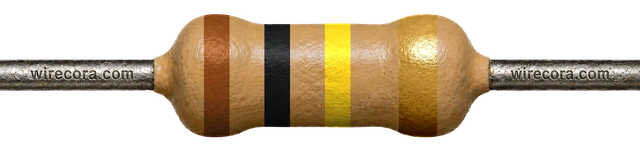
10 × 10,000 = 100,000 Ω = 100 kΩ
5-band version
Brown · Black · Black · Orange · Brown = 100 kΩ ±1%
100 × 1,000 = 100,000 Ω = 100 kΩ. Range 99–101 kΩ (±1%).
Open the 5-band version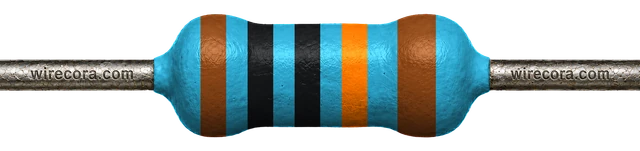
Where you'll meet it
Keeping a MOSFET off until the pin says on
An Arduino pin switches a logic-level N-channel MOSFET (such as an IRLZ44N), and the MOSFET switches a bigger load, such as a 12 V LED strip. While the board starts up, the pin is not driven, the gate floats and the load can turn on by itself. A 100 kΩ resistor from the gate to ground holds the gate at 0 V until the pin takes over.
I = 5 V / 100 kΩ = 0.05 mA
That is all the resistor costs while the pin is HIGH: 0.05 mA, or 5 V × 0.05 mA = 0.00025 W.
While the pin is not driven, the resistor is the gate's only path, so it pulls the gate to 0 V and the MOSFET stays off.
10 kΩ does the same job with a firmer hold and costs 5 V / 10 kΩ = 0.5 mA. 100 kΩ is the pick when every bit of current counts, as in battery projects.
Use a logic-level MOSFET whose datasheet gives its on-resistance, R_DS(on), at your pin voltage or lower. The IRLZ44N lists 5 V and 4 V, so it suits a 5 V pin but not a 3.3 V one. The threshold voltage only says where it starts to conduct. The 12 V supply and the Arduino must share ground. A motor, relay or solenoid also needs a flyback diode across it. Many builds add a small resistor of about 220 Ω between the pin and the gate; it is left out here to keep the drawing simple.
On SMD parts
Look for 104, 1003 or 01D
- 104104 = 10 × 10⁴ = 100,000 Ω (3-digit code).
- 10031003 = 100 × 10³ = 100,000 Ω (4-digit code, usually ±1% parts).
- 01D01D = 100 × 1,000 = 100,000 Ω (EIA-96: 01 means 100, D means ×1,000).
100 kΩ has an EIA-96 code because 100 is the first value in the E96 series.
Don't mix it up
Only band 3 changes
These four share Brown, Black and Gold. Yellow (×10,000) is 100 kΩ; orange is ten times less and green ten times more.
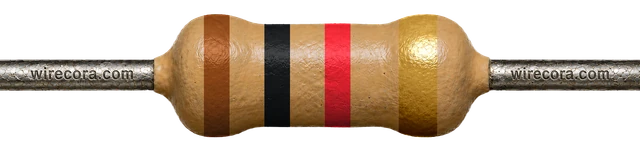 1 kΩband 3 red
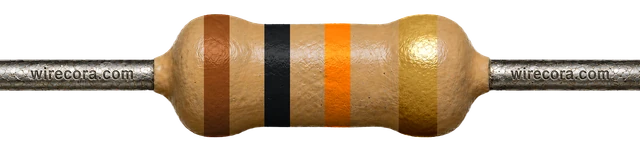 10 kΩband 3 orange
- 100 kΩband 3 yellowThis page
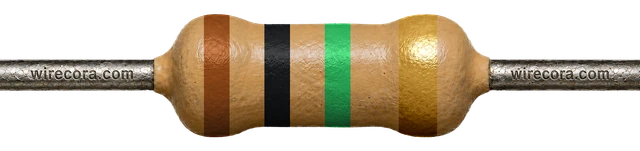 1 MΩband 3 green
Check it with a meter
Read 95–105 kΩ
- Take the resistor out of the circuit.
- Set the meter to Ω, range 200 kΩ (or auto).
- Touch one probe to each lead. Keep your fingers off the metal: your body is a resistor too. At 100 kΩ this matters a lot: with a finger on each lead the meter measures you as well, and the reading drops.
- Anything from 95 to 105 kΩ is a good ±5% part. A 5-band ±1% part should read 99 to 101 kΩ.
A meter has a small error of its own, so a reading a hair outside the range does not prove the part is bad. Measure again with firm contact before you swap it.
Spot it
Can you find 100 kΩ in a pile?
Practise reading it, and its look-alikes, in the resistor challenge.
Try the resistor challenge100 kΩ resistor FAQ
Why put a 100 kΩ resistor on a MOSFET gate?
A MOSFET gate holds whatever charge is left on it. If nothing drives the gate, as while a microcontroller starts up, the MOSFET can switch on by itself. A 100 kΩ resistor from the gate to ground drains that charge and keeps the MOSFET off. It costs only 5 V / 100 kΩ = 0.05 mA while the pin is HIGH.
What is the SMD code for a 100 kΩ resistor?
104 on 3-digit parts, 1003 on 4-digit parts, or 01D on EIA-96 parts (01 means 100, D means ×1,000).
What are the 5-band colors for 100 kΩ?
Brown, Black, Black, Orange, Brown: 100 × 1,000 = 100 kΩ with ±1% tolerance, so 99 to 101 kΩ.
How do I tell 100 kΩ from 10 kΩ?
Only the third band differs: yellow (×10,000) on 100 kΩ, orange (×1,000) on 10 kΩ. Yellow and orange can look alike on old or heat-darkened parts, so measure if you are unsure: 100 kΩ reads 95 to 105 kΩ, 10 kΩ reads 9.5 to 10.5 kΩ.
Bands, ranges and codes come from the same engine as the calculator. Last reviewed .