2.2 MΩ resistor color code
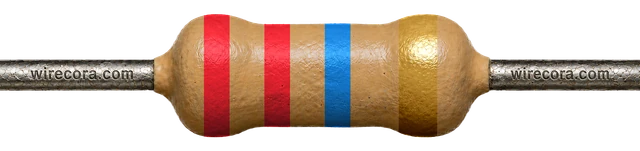
A 2.2 MΩ resistor is Red, Red, Green, Gold: 22 × 100,000 = 2,200,000 Ω, ±5%, so anything from 2.09 to 2.31 MΩ is in spec.
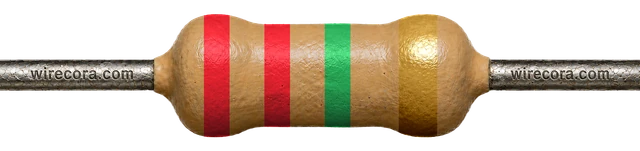
22 × 100,000 = 2,200,000 Ω = 2.2 MΩ
5-band version
Red · Red · Black · Yellow · Brown = 2.2 MΩ ±1%
220 × 10,000 = 2,200,000 Ω = 2.2 MΩ. Range 2.178–2.222 MΩ (±1%).
Open the 5-band version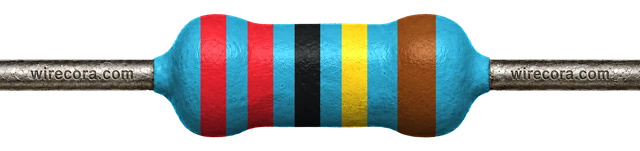
Where you'll meet it
A touch sensor made from foil
The Arduino CapacitiveSensor library needs one large resistor between two pins. Pin D4 sends a pulse through the 2.2 MΩ resistor, and pin D2, with a piece of foil attached, receives it. A hand on the foil adds capacitance, the pulse arrives later, and the library measures the delay.
τ = 2.2 MΩ × 100 pF = 0.22 ms
τ (tau) is roughly how long the receive pin takes to follow the send pin. 100 pF is the usual round figure for a human body; the real value varies a lot with the foil and the wiring.
With no hand there is far less capacitance, so the pulse arrives much sooner and the sketch can tell the two apart.
Almost no current flows: at most 5 V / 2.2 MΩ ≈ 2.3 µA.
The hand is drawn as a capacitor to ground because that is how it behaves; it is not a part you add. Readings change with the foil size, the wiring and how the board is powered, so expect to tune the threshold in code. The library's guide suggests about 1 MΩ when the pad must actually be touched and 10 MΩ or more to sense a hand from a distance; 2.2 MΩ sits near the touch end.
On SMD parts
Look for 225 or 2204
- 225225 = 22 × 10⁵ = 2,200,000 Ω (3-digit code).
- 22042204 = 220 × 10⁴ = 2,200,000 Ω (4-digit code, usually ±1% parts).
There is no EIA-96 code, because 2.2 MΩ is not an E96 value (the nearest E96 values are 2.15 MΩ and 2.21 MΩ).
Don't mix it up
Only band 3 changes
These four share Red, Red and Gold. Green (×100,000) is 2.2 MΩ; yellow is ten times less and blue ten times more.
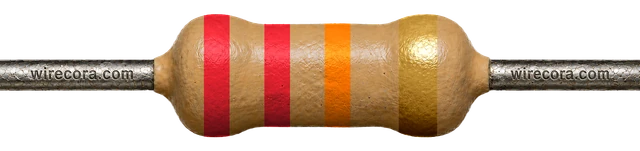 22 kΩband 3 orange
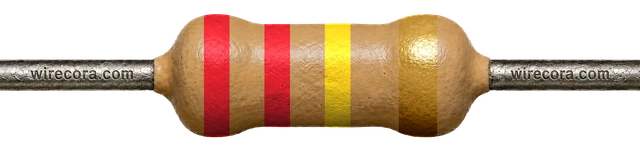 220 kΩband 3 yellow
- 2.2 MΩband 3 greenThis page
 22 MΩband 3 blue
Check it with a meter
Read 2.09–2.31 MΩ
- Take the resistor out of the circuit.
- Set the meter to Ω, range 20 MΩ (or auto). If your meter's highest range is 2 MΩ (often marked 2000k or 2M), it cannot measure this part and shows 1 or OL.
- Touch one probe to each lead. Keep your fingers off the metal: your body is a resistor too. At 2.2 MΩ this matters a lot: with a finger on each lead the meter measures you as well, and the reading drops.
- Anything from 2.09 to 2.31 MΩ is a good ±5% part. A 5-band ±1% part should read 2.178 to 2.222 MΩ.
A meter has a small error of its own, so a reading a hair outside the range does not prove the part is bad. Measure again with firm contact before you swap it.
Spot it
Can you find 2.2 MΩ in a pile?
Practise reading it, and its look-alikes, in the resistor challenge.
Try the resistor challenge2.2 MΩ resistor FAQ
What resistor do I need for an Arduino capacitive touch sensor?
Values from about 1 MΩ to 10 MΩ are the usual choice with the CapacitiveSensor library. A lower value needs real contact; a higher one reacts from further away. 2.2 MΩ is a good start for a pad you actually touch: taking about 100 pF for a hand, the time constant is 2.2 MΩ × 100 pF = 0.22 ms, and the delay the library measures is of that size.
What is the SMD code for a 2.2 MΩ resistor?
225 on 3-digit parts (22 × 10⁵) and 2204 on 4-digit parts (220 × 10⁴). There is no EIA-96 code, because 2.2 MΩ is not an E96 value.
What are the 5-band colors for 2.2 MΩ?
Red, Red, Black, Yellow, Brown: 220 × 10,000 = 2.2 MΩ with ±1% tolerance, so 2.178 to 2.222 MΩ.
What does 2M2 mean?
2M2 is another way to write 2.2 MΩ. The M sits where the decimal point would be, so the point cannot get lost in small print or on a schematic. In the same way, 4M7 means 4.7 MΩ.
Bands, ranges and codes come from the same engine as the calculator. Last reviewed .