15 kΩ resistor color code
A 15 kΩ resistor is Brown, Green, Orange, Gold: 15 × 1,000 = 15,000 Ω, ±5%, so anything from 14.25 to 15.75 kΩ is in spec.
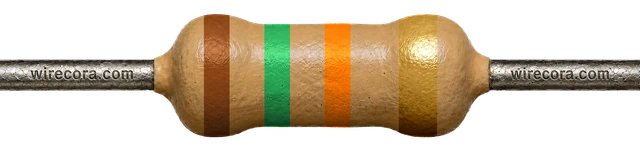
15 × 1,000 = 15,000 Ω = 15 kΩ
5-band version
Brown · Green · Black · Red · Brown = 15 kΩ ±1%
150 × 100 = 15,000 Ω = 15 kΩ. Range 14.85–15.15 kΩ (±1%).
Open the 5-band version
Where you'll meet it
The 15 kΩ inside a computer's USB port
A computer knows something was plugged in because of resistors. The USB port pulls both data lines, D+ and D−, to ground through 15 kΩ each. A device such as a flash drive pulls D+ up to 3.3 V through 1.5 kΩ, and the port sees the line rise. A low-speed device, such as an older keyboard or mouse, pulls D− instead.
V_out = 3.3 V × 15 kΩ / (1.5 kΩ + 15 kΩ) = 3.0 V
With nothing plugged in, the 15 kΩ resistor holds D+ at 0 V. With a device attached, the two resistors form a divider and D+ rises to 3.0 V: the port now knows a device is there.
The port counts a resting line as high from 2.7 to 3.6 V, so 3.0 V is a clear high.
The pair draws 3.3 V / 16.5 kΩ = 0.2 mA, and the 15 kΩ resistor turns 3.0 V × 0.2 mA = 0.0006 W into heat.
The drawing shows only D+, and only while the line rests. Once data flows, both ends drive the lines hard and the resistors hardly matter. In most computers these resistors sit inside the USB chip, not on the board as separate parts. The USB standard allows the port's resistors anywhere from 14.25 to 24.8 kΩ; 15 kΩ and 1.5 kΩ are the usual figures. The device and the computer share ground through the cable.
On SMD parts
Look for 153, 1502 or 18C
- 153153 = 15 × 10³ = 15,000 Ω (3-digit code).
- 15021502 = 150 × 10² = 15,000 Ω (4-digit code, usually ±1% parts).
- 18C18C = 150 × 100 = 15,000 Ω (EIA-96: 18 means 150, C means ×100).
15 kΩ has an EIA-96 code because 150 is value number 18 in the E96 series.
Don't mix it up
Only band 3 changes
These four share Brown, Green and Gold. Orange (×1,000) is 15 kΩ; red is ten times less and yellow ten times more.
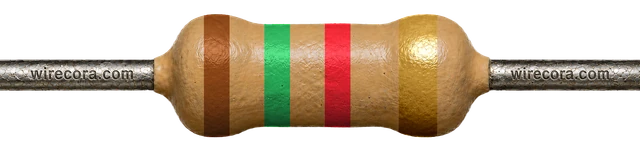 1.5 kΩband 3 red
- 15 kΩband 3 orangeThis page
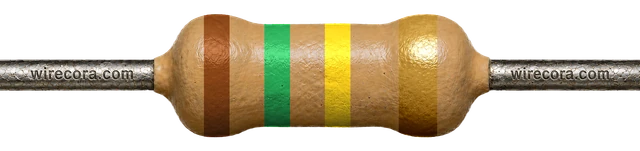 150 kΩband 3 yellow
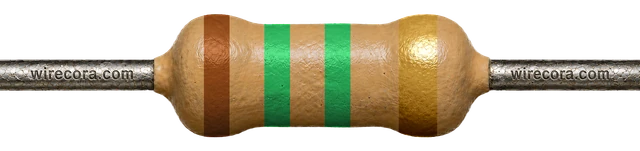 1.5 MΩband 3 green
Check it with a meter
Read 14.25–15.75 kΩ
- Take the resistor out of the circuit.
- Set the meter to Ω, range 20 kΩ (or auto).
- Touch one probe to each lead. Keep your fingers off the metal: your body is a resistor too.
- Anything from 14.25 to 15.75 kΩ is a good ±5% part. A 5-band ±1% part should read 14.85 to 15.15 kΩ.
A meter has a small error of its own, so a reading a hair outside the range does not prove the part is bad. Measure again with firm contact before you swap it.
Spot it
Can you find 15 kΩ in a pile?
Practise reading it, and its look-alikes, in the resistor challenge.
Try the resistor challenge15 kΩ resistor FAQ
Why is there a 15 kΩ resistor on USB data lines?
It lets the computer see that a device was plugged in. The port holds D+ and D− low through 15 kΩ each. A device pulls one line up through 1.5 kΩ (D+ for full and high speed, D− for low speed, which some keyboards and mice use), and that line rises to 3.3 V × 15 kΩ / 16.5 kΩ = 3.0 V.
What is the SMD code for a 15 kΩ resistor?
153 on 3-digit parts, 1502 on 4-digit parts, or 18C on EIA-96 parts (18 means 150, C means ×100).
What are the 5-band colors for 15 kΩ?
Brown, Green, Black, Red, Brown: 150 × 100 = 15 kΩ with ±1% tolerance, so 14.85 to 15.15 kΩ.
How do I tell 15 kΩ from 1.5 kΩ?
Only the third band differs: orange (×1,000) on 15 kΩ, red (×100) on 1.5 kΩ. Red and orange can look alike under warm light, so measure if you are unsure: 15 kΩ reads 14.25 to 15.75 kΩ, 1.5 kΩ reads 1.425 to 1.575 kΩ.
Bands, ranges and codes come from the same engine as the calculator. Last reviewed .