150 Ω resistor color code
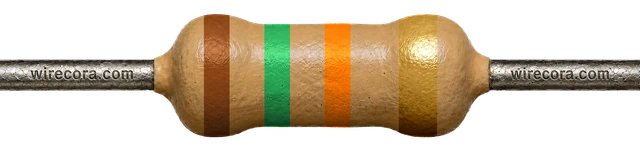
A 150 Ω resistor is Brown, Green, Brown, Gold: 15 × 10 = 150 Ω, ±5%, so anything from 142.5 to 157.5 Ω is in spec.
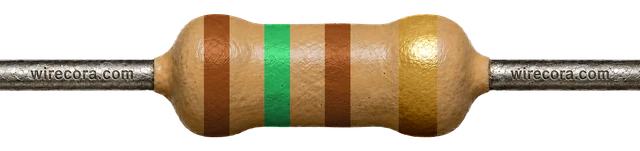
15 × 10 = 150 Ω
5-band version
Brown · Green · Black · Black · Brown = 150 Ω ±1%
150 × 1 = 150 Ω. Range 148.5–151.5 Ω (±1%).
Open the 5-band version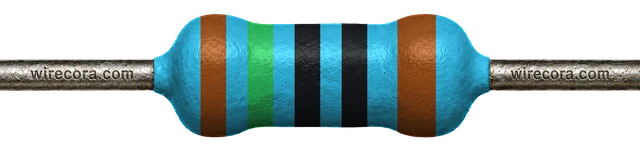
Where you'll meet it
A brighter LED on a Raspberry Pi pin
A Raspberry Pi pin gives only 3.3 V, so a red LED on the usual 330 Ω gets about 3.9 mA. For a brighter LED, 150 Ω lets more than twice that through and still stays inside what one pin should give. Here GPIO27 drives a red LED through 150 Ω to ground.
I = (3.3 V − 2.0 V) / 150 Ω ≈ 8.7 mA
That is clearly bright, and under the 16 mA that one Raspberry Pi pin should give. All the GPIO pins together should stay under 50 mA, so up to five of these LEDs can be on at once.
Do not move it to a 5 V Arduino pin: there it gives (5 V − 2.0 V) / 150 Ω = 20 mA, right at the most a pin should give. Use 220 Ω there.
The resistor turns (8.7 mA)² × 150 Ω ≈ 0.011 W into heat, so any ¼ W (0.25 W) part is fine.
2.0 V is a typical red LED forward voltage. Check your LED's datasheet. The pin voltage also sags a little under load, so the real current is slightly lower. Blue and white LEDs drop about 3.0 to 3.3 V, so a 3.3 V pin can push at most (3.3 V − 3.0 V) / 150 Ω = 2 mA through one: dim at best.
On SMD parts
Look for 151, 1500 or 18A
- 151151 = 15 × 10¹ = 150 Ω (3-digit code).
- 15001500 = 150 × 10⁰ = 150 Ω (4-digit code, usually ±1% parts).
- 18A18A = 150 × 1 = 150 Ω (EIA-96: 18 means 150, A means ×1).
150 Ω has an EIA-96 code because 150 is value number 18 in the E96 series. A part marked 150 is 15 Ω, not 150 Ω.
Don't mix it up
Only band 3 changes
These four share Brown, Green and Gold. Brown (×10) is 150 Ω; black is ten times less and red ten times more.
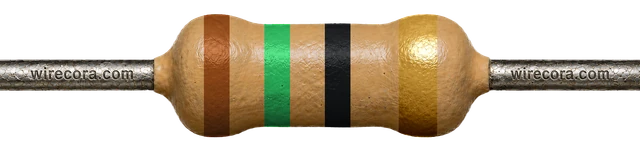 15 Ωband 3 black
- 150 Ωband 3 brownThis page
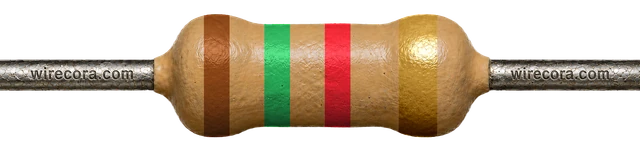 1.5 kΩband 3 red
 15 kΩband 3 orange
Check it with a meter
Read 142.5–157.5 Ω
- Take the resistor out of the circuit.
- Set the meter to Ω, range 200 Ω (or auto).
- Touch one probe to each lead. Keep your fingers off the metal: your body is a resistor too.
- Anything from 142.5 to 157.5 Ω is a good ±5% part. A 5-band ±1% part should read 148.5 to 151.5 Ω.
A meter has a small error of its own, so a reading a hair outside the range does not prove the part is bad. Measure again with firm contact before you swap it.
Spot it
Can you find 150 Ω in a pile?
Practise reading it, and its look-alikes, in the resistor challenge.
Try the resistor challenge150 Ω resistor FAQ
Can I use a 150 Ω resistor for an LED on a Raspberry Pi?
Yes. With a typical red LED (about 2.0 V) it sets (3.3 V − 2.0 V) / 150 Ω ≈ 8.7 mA: brighter than the 3.9 mA of the usual 330 Ω, and under the 16 mA one pin should give. On a 5 V Arduino pin it would give 20 mA, right at that pin's limit, so use 220 Ω there.
What is the SMD code for a 150 Ω resistor?
151 on 3-digit parts, 1500 on 4-digit parts, or 18A on EIA-96 parts (18 means 150, A means ×1).
What are the 5-band colors for 150 Ω?
Brown, Green, Black, Black, Brown: 150 × 1 = 150 Ω with ±1% tolerance, so 148.5 to 151.5 Ω.
What does 150R mean?
150R is another way to write 150 Ω. The R stands for ohms and sits where the decimal point would be, so 4R7 means 4.7 Ω. With nothing after the R, 150R is exactly 150 Ω.
Bands, ranges and codes come from the same engine as the calculator. Last reviewed .